MAVLink over ELRS: The 'Airport' Bridge
Executive Summary
Traditionally, Long Range pilots needed two radios: Crossfire for Control, and SiK Radio (900MHz) for MAVLink Telemetry. ELRS "Airport" combines them. By sacrificing some control bandwidth, you can turn the ELRS link into a transparent bidirectional serial bridge, allowing full Mission Planner / QGC connection without extra hardware.
Theory & Concepts
1. The "Airport" Architecture
ELRS is usually a "Control" protocol (Channels). Airport turns it into a "Data" protocol (Bytes).
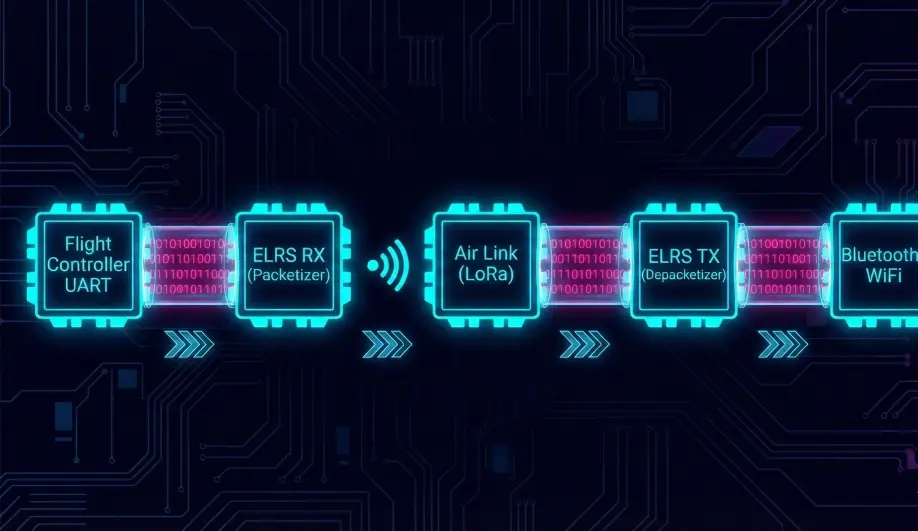
- Packet Switching: The ELRS firmware repacks the raw serial bytes from the Receiver's UART into LoRa packets.
- The Cost: This consumes airtime. If you enable Airport, you typically drop to a lower control rate (e.g., 50Hz control + data) to make room for the data.
2. Baud Rate Alignment
MAVLink is a serial protocol.
- The Bottleneck: The UART buffer.
- The Rule: You MUST set both the Receiver UART and the Flight Controller UART to 460800 baud (or higher).
- Why? ELRS sends data in high-speed bursts. If the UART is too slow (57600), the buffer overflows instantly, and packets drop. 460k ensures the UART is faster than the Air Link.
Architecture (The Engineer's View)
1. Flight Controller Setup
To use Airport, you bypass the RCProtocol decoder.
SERIALx_PROTOCOL = 2(MAVLink 2).SERIALx_BAUD = 460(460800).- Note: You do NOT use
23(RCIN). You treat the ELRS receiver exactly like a SiK Radio.
2. Throughput Reality
- Uplink (TX -> Drone): Very fast. Good for upload.
- Downlink (Drone -> TX): Limited by Telemetry Ratio.
- 1:2 Ratio: 50% of packets are downlink. Good for HUD.
- 1:64 Ratio: 1.5% of packets are downlink. Useless for HUD.
Common Issues & Troubleshooting
"Mission Planner connects but params are slow"
- Cause: Bandwidth saturation. MAVLink overhead is high.
- Fix: Use 1:2 Ratio. Increase Packet Rate (e.g., 333Hz). Be patient.
"No RC Control"
- Cause: You set the Serial Port to MAVLink (2). ArduPilot is now listening for MAVLink commands, not RC Channels.
- Fix: You must send RC Override via MAVLink OR use a receiver that outputs CRSF on one pin (for control) and MAVLink on another pin (for data).
Source Code Reference
- CRSF Driver (Alternative):
AP_RCProtocol_CRSF.cpp
Practical Guide: Configuring "Airport"
WARNING: This disables standard RC control on the Airport pins. Ensure you have a failsafe or a separate RC connection (e.g. CRSF on a different UART) if you are just testing.
Step 1: Receiver Config (WiFi)
- Connect to your ELRS Receiver WiFi.
- Go to Model tab.
- Serial Protocol: Transparent Serial (Airport).
- Baud Rate: 460800.
- Save & Reboot.
Step 2: Transmitter Config (Lua)
- Open ELRS Lua script.
- Packet Rate: 333Hz Full (or 100Hz Full).
- Telem Ratio: 1:2 (Max Bandwidth).
Step 3: ArduPilot Config
- Identify the UART connected to the receiver (e.g., SERIAL1).
SERIAL1_PROTOCOL = 2(MAVLink 2).SERIAL1_BAUD = 460(460800).- Reboot.
Step 4: The Connection
- Connect your PC/Tablet to the ELRS TX module (via WiFi, Bluetooth, or USB).
- Open Mission Planner.
- Connect via UDP/COM.
- You should see the param download start. It will be slower than USB, but it works.