Packet Rates, Latency & Range
Executive Summary
One size does not fit all. ExpressLRS forces you to choose your Packet Rate (Update Frequency). This choice defines the fundamental capabilities of your link. A 1000Hz link feels instantaneous but is fragile behind trees. A 50Hz link feels sluggish but can punch through a concrete building.
Theory & Concepts
1. The Latency Triangle
You can pick two:
- Speed (Low Latency): Good for racing. Requires fast packets.
- Range (Sensitivity): Good for long-range. Requires slow packets (high Spreading Factor).
- Reliability: Good for noise. Requires redundancy (DVDA/Gemini).
2. The Rates
- 1000Hz / F1000: The "God Mode" of racing.
- Latency: ~1.5ms.
- Physics: Uses FLRC (Fast Long Range Communication), not LoRa. It behaves like standard FSK. Sharp cliff effect at range limit.
- 500Hz: The standard for Freestyle.
- Latency: ~2.5ms.
- Physics: Lowest LoRa setting. Good balance.
- 250Hz: The "Sweet Spot" for MAVLink.
- Latency: ~6ms.
- Reasoning: It provides enough bandwidth for Telemetry (1:2 ratio) while maintaining excellent range.
- 50Hz: The "Long Range King."
- Latency: ~22ms.
- Physics: High Spreading Factor. Can decode signals 18dB lower than 500Hz. This triples your range.
3. Link Quality (LQ)
In legacy systems, RSSI (Signal Strength) was king. In ELRS, LQ is king.
- LQ: The percentage of packets successfully received.
- The Cliff: LoRa works perfectly until it doesn't. You can have perfect control at -120dBm (basically zero signal) as long as LQ is high.
- The Warning: If LQ drops below 70%, you are losing data.
Architecture (The Engineer's View)
1. Packet Cycle
At 500Hz, a cycle is 2ms.
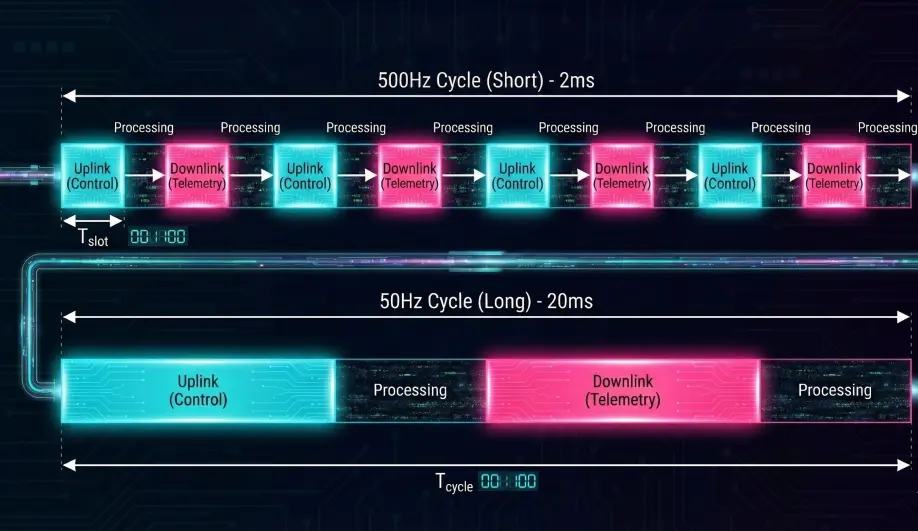
- Uplink (TX -> RX): Control Data.
- Downlink (RX -> TX): Telemetry (if it's the telemetry slot).
- Processing: The Flight Controller must run its loop fast enough (400Hz/1kHz) to consume this data without aliasing.
2. MAVLink Implications
For MAVLink HUD usage:
- 50Hz: Too slow. 1:2 ratio = 25Hz telemetry. Max bandwidth ~200 bytes/sec. Not enough for smooth HUD.
- 250Hz: Recommended. 1:2 ratio = 125Hz telemetry. Max bandwidth ~1000 bytes/sec. Smooth HUD.
Key Parameters
Packet Rate(Lua Script): The master setting.Telem Ratio(Lua Script): How often to send data back.
Source Code Reference
- Documentation: ELRS Modes
Practical Guide: Unlocking Smooth Telemetry
Many pilots connect ELRS and see MAVLink data at a crawl (0.5Hz - 1Hz). This is not a bug; it is ArduPilot reacting to your link health.
The Mechanism
ArduPilot monitors the "RF Mode" reported by your ELRS receiver via the CRSF protocol.
- Low Speed (50Hz - 150Hz): ArduPilot enters "Bandwidth Conservation Mode." It strictly limits telemetry to essential stats (Battery, GPS) at very low rates to prioritize RC control packets and prevent link congestion.
- High Speed (250Hz+): ArduPilot unlocks the "High Speed Profile," allowing much faster telemetry updates suitable for HUDs and real-time monitoring.
The Fix
- On your Transmitter (Lua Script): Set Packet Rate to 333Hz Full or 500Hz.
- Telemetry Ratio: Set to Std (1:64) or 1:2.
- Counter-Intuitive: Even if you set a high ratio (1:2) at 50Hz, the total bandwidth is still too low for ArduPilot's scheduler to feel comfortable sending bulk data. You must increase the Packet Rate to unlock the scheduler.
Verification
Check the LINK_STATISTICS or RADIO_STATUS message. If rx_errors is low but the stream rate is high, ArduPilot has successfully engaged the high-speed profile.
For more details on ArduPilot's CRSF integration, see the ArduPilot Wiki: CRSF Telemetry.