MAVLink Routing
Executive Summary
ArduPilot does not just consume MAVLink data; it acts as a Packet Switch (Router). If you connect a telemetry radio to SERIAL1 and an OSD to SERIAL2, ArduPilot can transparently forward messages between them. This system allows a ground station to communicate with a peripheral (like a gimbal or smart battery) through the flight controller without a direct connection.
Theory & Concepts
1. The Network Topology Problem
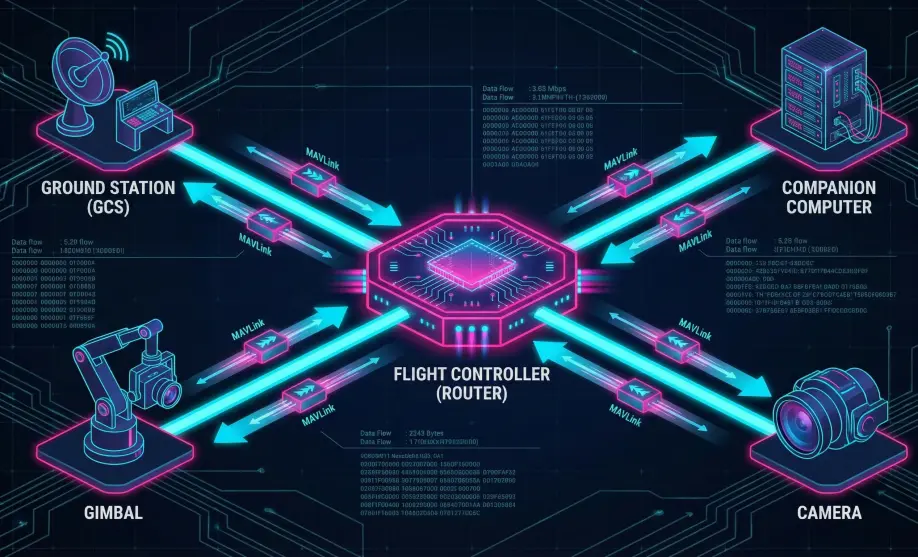
Early drones were simple: Ground Station <-> Drone. A single serial wire.
Modern drones are networks: Ground Station <-> Drone <-> Gimbal <-> Camera <-> Companion Computer.
- The Challenge: How does the Ground Station tell the Camera to "Take Picture" if the Camera is plugged into the Drone, not the Ground Station?
- The Solution: MAVLink Routing. Every device has a unique address (System ID, Component ID). The Flight Controller acts as the "Hub," forwarding mail to the correct recipient.
2. Broadcast vs. Targeted
- Broadcast (Target=0): "To Whom It May Concern". Examples:
ATTITUDE,GPS_RAW. Everyone needs to see these. ArduPilot copies them to all ports. - Targeted: "To System 1, Component 154". Examples:
COMMAND_LONG(Move Gimbal). ArduPilot looks up "154" in its phonebook (Routing Table) and sends it only to the correct port. This saves bandwidth.
Architecture (The Engineer's View)
The core logic resides in the MAVLink_routing class.
1. The Routing Table
The system maintains a dynamic routing table of known devices on the network.
- Capacity: It tracks up to
MAVLINK_MAX_ROUTES(default: 5) external devices. - Learning: The table is populated automatically via
learn_route().
2. Packet Forwarding Logic
When a packet arrives, check_and_forward() decides its fate:
- Targeted Messages: (Packet has a specific
Target_SysIDandTarget_CompID).- The router looks up the target in the table.
- If found: It forwards the packet only to the mapped channel.
- If not found: It broadcasts the packet to all channels (except the source).
- Broadcast Messages: (Target = 0).
- The packet is forwarded to all active channels (except the source).
- Local Processing:
- Regardless of forwarding, the packet is also passed to the internal flight controller logic for processing.
Private Channels (MAV_OPT_PRIVATE)
You can mark a specific serial port as "Private" using the SERIALx_OPTIONS parameter.
- Behavior:
- Packets from a private channel are NOT forwarded to other channels (unless specifically whitelisted, like GoPro).
- Packets to a private channel are restricted.
- Use Case: Connect a high-bandwidth internal peripheral (like a companion computer sending vision data) without flooding your low-bandwidth telemetry radio link.
Common Issues & Troubleshooting
"I can't see my Gimbal parameters"
- Cause: The routing table might be full, or the Gimbal hasn't sent a HEARTBEAT yet.
- Fix: Ensure the peripheral sends heartbeats. Check if you have too many MAVLink peripherals (more than 5).
"Telemetry Lag"
- Cause: Broadcast loops. If you have two telemetry radios connected to the same network (e.g., WiFi + RF) without proper configuration, packets can loop endlessly.
- Fix: ArduPilot has loop detection (it won't forward a packet back to its source), but complex topologies can still cause storms. Use distinct System IDs.
"GCS sees the Drone but not the GPS"
- Cause:
SERIALx_PROTOCOLmismatch. - Fix: Ensure both ports use MAVLink 1 or MAVLink 2. Routing between protocol versions works, but features like Signing might break.
Source Code Reference
- Routing Logic:
libraries/GCS_MAVLink/MAVLink_routing.cpp - Table Definition:
libraries/GCS_MAVLink/MAVLink_routing.h
Practical Guide: Isolating Traffic with Private Channels
If you connect a Companion Computer (RPi) sending high-speed MAVLink (Vision, Obstacle Avoidance) to Serial 2, ArduPilot's default behavior is to forward ALL of that traffic to your Telemetry Radio on Serial 1. This will instantly choke your 57600 baud radio link.
The Fix: SERIALn_OPTIONS
- Identify the port connecting to the high-bandwidth device (e.g.,
SERIAL2). - Set
SERIAL2_OPTIONS= 1024 (Bit 10: "Don't forward MAVLink to/from").- Note: If you are already using other options (like Swap), add 1024 to the existing value.
- Result:
- ArduPilot consumes the Vision data from Serial 2.
- ArduPilot does NOT forward it to Serial 1 (Telemetry).
- Your radio link remains clean and low-latency.
For more details, see the ArduPilot Wiki: Serial Options.