Vibration Analysis & FFT
Executive Summary
Vibration is the root cause of many flight issues, from "Jello" video to EKF Lane Switching and even flyaways. ArduPilot provides two powerful tools to diagnose this: VIBE logs (broadband vibration level) and FFT logs (frequency-specific vibration).
Theory & Concepts
1. Vibration Levels (VIBE)
VIBE measures the "roughness" of the ride.
- Metric: Standard Deviation of the accelerometer signal in $m/s^2$.
- Filtering: ArduPilot calculates this by subtracting a 5Hz low-pass filtered signal from the raw signal. What remains is the high-frequency "noise."
- Clipping: When vibration exceeds the sensor's range (e.g., 16G), the accelerometer "clips" (flatlines). This destroys the EKF's ability to estimate gravity.
2. Fast Fourier Transform (FFT)
VIBE tells you how much vibration exists. FFT tells you at what frequency.
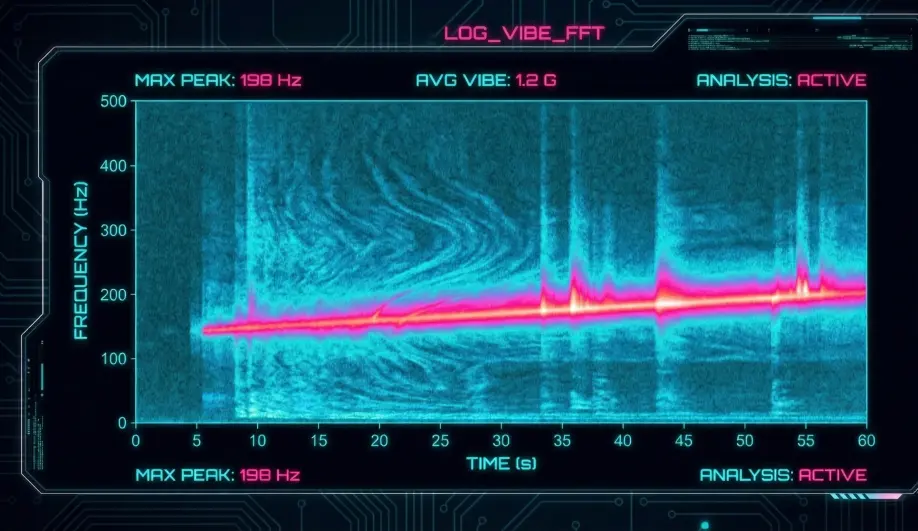
- Fundamental: The primary frequency usually corresponds to the motor RPM ($RPM / 60$).
- Harmonics: Multiples of the fundamental ($2x, 3x$).
- Use Case: We use FFT graphs to precisely tune the Harmonic Notch Filter.
Codebase Investigation
1. Vibe Calculation: calc_vibration_and_clipping()
Located in libraries/AP_InertialSensor/AP_InertialSensor.cpp.
- Logic:
accel_filt = _accel_vibe_floor_filter.apply(accel)(5Hz LPF).accel_diff = accel - accel_filt.vibe = _accel_vibe_filter.apply(accel_diff^2)(2Hz LPF of the square).
- Clipping: If
fabsf(accel.x) > 16G, increment_accel_clip_count.
2. FFT Logging
- The AP_GyroFFT library performs real-time frequency analysis on the gyro data.
- Log Message:
FTN(Filter Tune). Logs the center frequency and bandwidth of the detected noise peaks.
Source Code Reference
Practical Guide: Analyzing Vibration
1. Acceptable VIBE Levels
- < $15 m/s^2$: Excellent.
- $15 - 30 m/s^2$: Acceptable for most multirotors.
- > $30 m/s^2$: Problematic. Position hold may wander.
- > $60 m/s^2$: Dangerous. EKF may fail.
2. Diagnosing with FFT
- Enable "Batch Sampling" (
INS_LOG_BAT_MASK = 1). - Hover the drone for 1 minute.
- Open the log in Mission Planner -> press Ctrl+F -> FFT.
- Look for the big spike. That is your
INS_HNTCH_FREQ.
3. Clipping = Crash
If VIBE.Clip0, Clip1, or Clip2 increases during flight, you have a hard mounting issue or a damaged prop. Do not fly until fixed.