The Mission Item Protocol
Executive Summary
Uploading a mission (Waypoints) is a critical operation that requires 100% data integrity. Unlike telemetry (where dropping a packet is fine), dropping a Waypoint could crash the drone. The Mission Item Protocol is a transactional state machine that ensures every single point is received and verified before the mission is accepted. It handles Missions, Geofences, and Rally Points using a unified codebase.
Theory & Concepts
1. Transactional Integrity
In database theory, a transaction must be Atomic. It either succeeds completely or fails completely. Mission uploads follow this rule. If you lose connection after uploading 49 of 50 waypoints, ArduPilot will reject the entire mission. It never attempts to fly a partial mission.
2. The "Handshake" Design
Why does ArduPilot request the items rather than the GCS pushing them? This is a "Pull" design that prevents the drone's memory from being flooded. The drone controls the rate of the transaction, ensuring it has enough time to write each waypoint to the permanent EEPROM/Flash storage before requesting the next one.
Architecture (The Engineer's View)
The logic is implemented in the MissionItemProtocol class.
1. Unified Design
ArduPilot uses polymorphism to handle different data types. The base class manages the MAVLink handshake, while subclasses handle the storage:
MissionItemProtocol_Waypoints: Writes toAP_Mission(EEPROM).MissionItemProtocol_Fence: Writes toAC_Fence(RAM/Storage).MissionItemProtocol_Rally: Writes toAP_Rally(Storage).
2. The Upload Transaction (GCS to Drone)
The upload follows a strict "Pull" model to ensure reliability.
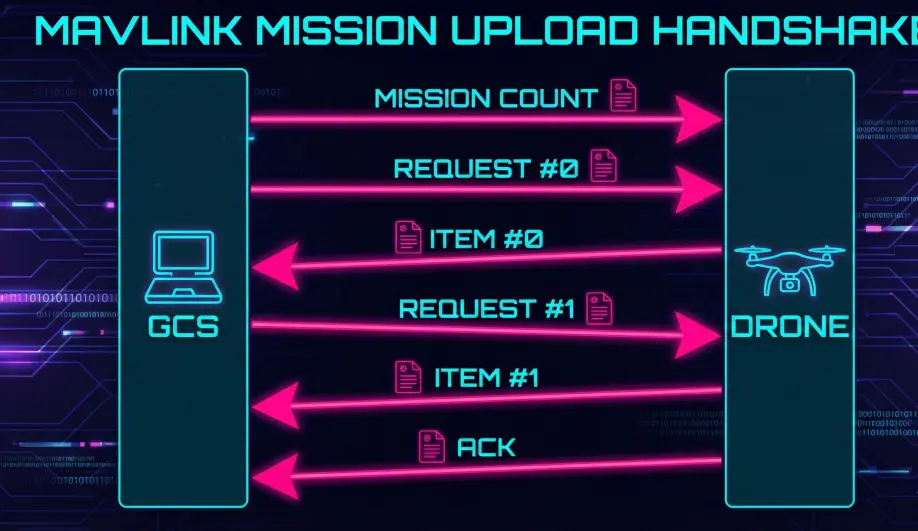
- Initiation: The GCS sends
MISSION_COUNT(e.g., "I have 50 waypoints"). - Allocation: ArduPilot checks if it has memory for 50 items. If yes, it requests the first one.
- The Loop:
- ArduPilot sends
MISSION_REQUEST_INTfor Item #0. - GCS sends
MISSION_ITEM_INT#0. - ArduPilot verifies #0, stores it, and sends
MISSION_REQUEST_INTfor Item #1. - Reliability: If ArduPilot doesn't receive Item #0 within 1 second, it re-sends the request. This repeats until the item arrives or the operation times out.
- ArduPilot sends
- Completion: Once the last item is received, ArduPilot sends
MISSION_ACK(Accepted).
3. The Download Transaction (Drone to GCS)
Downloading is a "Push" model but still acknowledged.
- GCS sends
MISSION_REQUEST_LIST. - ArduPilot sends
MISSION_COUNT. - GCS requests items one by one (
MISSION_REQUEST_INT). - ArduPilot replies with the item.
Common Issues & Troubleshooting
"Mission Upload Failed (Timeout)"
- Cause: Extremely high packet loss. The "Request -> Item" loop failed so many times that the 8-second global timeout triggered.
- Fix: Check radio range. The protocol handles occasional drops, but not a dead link.
"Mission Rejected"
- Cause: You tried to upload more waypoints than the board supports (e.g., >700 on some boards), or the
MISSION_COUNTpacket was corrupted.
Source Code Reference
- Protocol Logic:
MissionItemProtocol.cpp - Count Handler:
handle_mission_count()
Practical Guide: Mission Upload Safety
A corrupt mission can cause a flyaway. Follow these rules to ensure safety.
1. Verify the ACK
Never assume a mission uploaded just because the progress bar finished.
- Look for:
MISSION_ACK(Result: 0). - Meaning: ArduPilot has verified the count, stored all points, and closed the transaction. The mission is safe to fly.
2. The "Readback" Rule
In professional operations, we trust but verify.
- Upload the Mission.
- Download the Mission from the drone (Readback).
- Compare the downloaded path with your planned path.
- Why? This catches rare EEPROM corruption or logic errors where ArduPilot might have "snapped" a waypoint to a nearby grid or truncated a float value.
3. Check "Total Distance"
After upload, Mission Planner displays "Total Distance".
- Sanity Check: If you planned a 2km flight but the total distance is 12,000km, one of your waypoints is at (0,0) [Null Island]. Do not fly.