The BendyRuler Algorithm
Executive Summary
BendyRuler is ArduPilot's local path planner for complex environments. Unlike "Simple Avoidance" which just stops or slides, BendyRuler actively searches for an open path around an obstacle.
It works by "feeling" around the vehicle with virtual feelers (rays) to find the direction that offers the best compromise between Safety (clearance from obstacles) and Progress (heading towards the destination).
Theory & Concepts
1. The "Feeler" Approach
BendyRuler projects virtual lines (rays) in multiple directions around the vehicle.
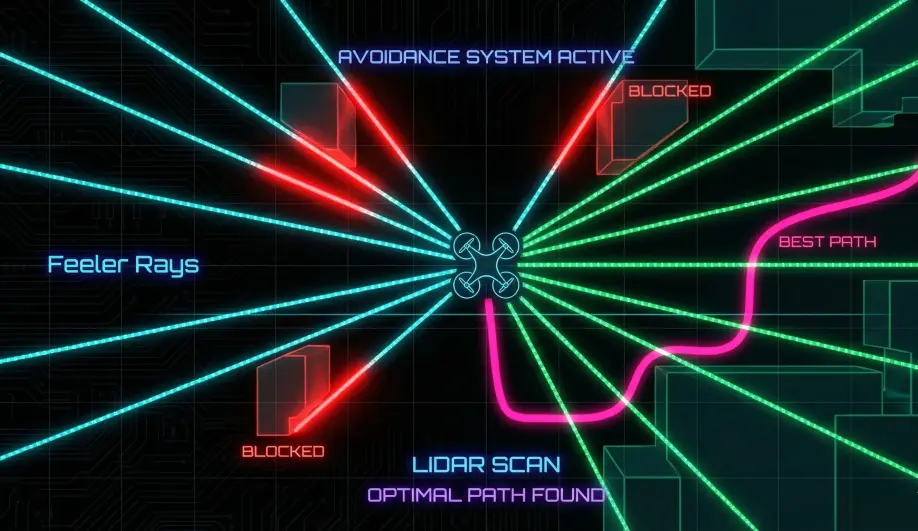
- Search Sector: Typically +/- 45 to 90 degrees from the destination bearing.
- Ray Length: Determined by OA_BR_LOOKAHEAD.
- Evaluation: For each ray, it checks: "If I fly this way for $X$ meters, will I hit anything?"
2. Margin Maximization
The algorithm doesn't just look for any open path; it calculates a "Margin Score" for every candidate bearing.
- Margin: The minimum distance between the ray and the nearest obstacle.
- Selection: It chooses the bearing that has a sufficient margin ($>$ OA_MARGIN_MAX) and is closest to the target destination.
3. Hysteresis (Anti-Jitter)
To prevent the drone from indecisively switching between a "Left" path and a "Right" path, BendyRuler implements a resistance mechanism. It will stick to the current evasion path unless a new path offers a significantly better margin (defined by OA_BR_TYPE).
Codebase Investigation
1. The Search Loop: search_xy_path()
Located in libraries/AC_Avoidance/AP_OABendyRuler.cpp.
- Iterates through bearings in 5-degree increments.
- Calls
calc_avoidance_margin()for each test ray. - Two-Stage Lookahead:
- Step 1: Check immediate path (short lookahead).
- Step 2: If Step 1 is clear, check further out (long lookahead) to ensure we aren't flying into a cul-de-sac.
2. Margin Calculation: calc_avoidance_margin()
This function checks intersection against:
- Circular Fences.
- Polygon Fences.
- Proximity Database (AP_OADatabase - fused Lidar/Radar points).
3. Stability Logic: resist_bearing_change()
- Input:
_bendy_ratio(default 1.1). - Logic: If the new best path is only 10% better than the current path, ignore it. This dampens the decision logic. See
resist_bearing_change().
Source Code Reference
- Algorithm Implementation:
libraries/AC_Avoidance/AP_OABendyRuler.cpp
Practical Guide: Tuning BendyRuler
1. "It stops too early"
- Check:
OA_BR_LOOKAHEAD. - Fix: If you are flying fast, you need a long lookahead. But if you are indoors, a 10m lookahead might see a wall that is actually far away. Reduce it for tight spaces.
2. "It Wiggles"
- Symptom: Drone oscillates left/right while facing an obstacle.
- Fix: Increase
OA_BR_TYPE(Margin Ratio). Making it "stickier" (e.g., 1.5) stops it from switching paths constantly.
3. "It Gets Stuck in Corners"
- Cause: BendyRuler is a local planner. It doesn't know the maze layout.
- Fix: Enable Dijkstra (
OA_TYPE= 2) for global pathfinding if you operate in complex polygon fences.
How To: Configure BendyRuler for Copter
BendyRuler is the standard for "Dodge and Continue" missions. Here is the standard config for a 5-inch quadcopter.
1. Enable Path Planning
OA_TYPE=1(BendyRuler). This replaces the simple "Stop" behavior with "Pathfind".
2. Set Physical Limits
BendyRuler needs to know how agile your drone is.
OA_BR_LOOKAHEAD:10(Meters). Look 10m ahead. Increase for fast drones (>15m/s).OA_MARGIN_MAX:3(Meters). The "Search" margin. If a path is closer than 3m to an obstacle, it is penalized.
3. Tune Behavior
OA_BR_TYPE:1(Horizontal Only). Most Copters only have 2D Lidar. Use2for 3D Avoidance if you have a Realsense/Depth Camera.- OA_BR_SO_TURN:
1(Spin on Spot). If blocked, the drone will stop and yaw to scan for a path before proceeding.
Test It: Set up two cardboard boxes 5m apart. Upload a mission that flies straight through them. The drone should deviate from the straight line, fly between the boxes (or around them), and return to the path.