The Yaapu Problem & The HUD Solution
Executive Summary
For years, ArduPilot users have relied on the Yaapu Telemetry Script to see flight data on their radio screens. However, as pilots move to MAVLink over ELRS for professional control, they hit a wall: enabling MAVLink breaks Yaapu. You cannot have both. This document explains the technical reason for this conflict and why the MAVLink HUD architecture is the superior evolution for modern ground stations.
The Conflict: Protocol Exclusivity
A serial link (UART) can only speak one language at a time.
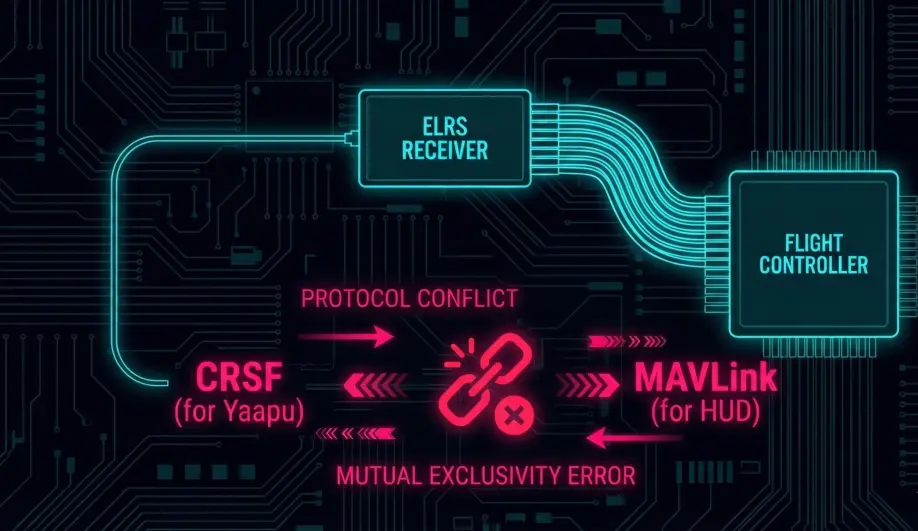
- Yaapu (CRSF Telemetry): Requires the receiver to speak "CRSF." ArduPilot translates its internal state into CRSF frames (GPS, Battery, Attitude) and sends them down the wire.
- MAVLink HUD (Airport): Requires the receiver to act as a Transparent Bridge. It doesn't "speak" anything; it just shuffles raw bytes back and forth.
- The Problem: If you enable "Airport" to get MAVLink for your tablet, the radio stops seeing CRSF Telemetry packets. The Yaapu script on your radio screen goes dark saying "No Telemetry."
The "Converter" Nightmare
Some users try to hack around this by using an ESP32 "Converter" board.
- The Hack: They wire the receiver to the ESP32, which splits the signal. It sends MAVLink to the Wifi and translates MAVLink back to CRSF for the radio.
- The Cost: This adds latency, wiring complexity, and a new point of failure. It is a band-aid solution.
The HUD Solution: Move the Screen
The fundamental question is: Why are we trying to display complex flight data on a 128x64 monochrome LCD from 2015?
1. The Screen Real Estate
- Radio Screen: Small, low resolution, mono/low-color. Good for voltage, bad for maps.
- MAVLink HUD (Phone/Tablet): 1080p+, High Contrast OLED, 60fps GPU rendering.
- Result: We can render a true Primary Flight Display (PFD) with an artificial horizon, scrolling tapes, and a moving map that is readable in sunlight.
2. Processing Power
- Radio (STM32): Running a LUA script burdens the radio's CPU. Complex scripts can slow down the user interface or even crash the radio.
- Phone (Snapdragon/Apple): The HUD app runs on a dedicated multi-core processor with a GPU. It handles map rendering, logging, and voice synthesis without breaking a sweat.
3. The Architecture Shift
Instead of forcing the Radio Controller to be a Ground Control Station, we let the Radio focus on Control (High Speed ELRS) and offload the Visualization to the device best suited for it (The Tablet).
- The Link: The ELRS Backpack acts as the bridge. The Radio handles the sticks. The Backpack handles the Wi-Fi data stream to the HUD.
- The Result: A cleaner, more professional, and more robust system.
Summary
If you are flying Line-of-Sight, Yaapu is great. If you are flying Long Range or Autonomous missions, MAVLink is mandatory. Don't fight the protocol; embrace the HUD architecture.
Source Code Reference
- CRSF Telemetry (Yaapu):
AP_CRSF_Telem.cpp - MAVLink Bridge (HUD):
AP_RCProtocol_CRSF.cpp(When in pure passthrough)
Practical Guide: Choosing Your Path
You must choose one. You cannot have both on the same UART.
Path A: The Racer (Yaapu)
- Hardware: ELRS Receiver.
- Protocol:
SERIALx_PROTOCOL = 23(RCIN). - Advantages: Clean setup, data on radio.
- Disadvantages: No Mission Planner, no Maps, no "Click to Fly".
Path B: The Professional (MAVLink HUD)
- Hardware: ELRS Receiver (Airport Mode) or separate Telemetry Radio.
- Protocol:
SERIALx_PROTOCOL = 2(MAVLink 2). - Advantages: Full GCS control, moving map, HD telemetry.
- Disadvantages: Your radio screen will be blank (except for basic LQ/RSSI from the module itself).
The Compromise (Dual Links)
If you absolutely must have both:
- UART 1: ELRS Receiver (RCIN) -> Feeds Yaapu.
- UART 2: ESP8266 WiFi Bridge (MAVLink) -> Feeds Tablet.
- Note: This requires two UARTs on the flight controller.