AUTOTUNE Mode (Plane)
Executive Summary
AUTOTUNE Mode is a utility mode designed to automatically calibrate the Roll, Pitch, and Yaw PID controllers while you fly. It removes the guesswork from tuning a fixed-wing aircraft. The pilot flies the plane normally (it feels like FBWA), and the autopilot constantly analyzes the response to stick inputs, adjusting gains in real-time to achieve the desired response defined by RLL2SRV_TCONST and PTCH2SRV_TCONST.
Theory & Concepts
1. Step-Response Analysis
Autotune is a "Black Box" identification algorithm.
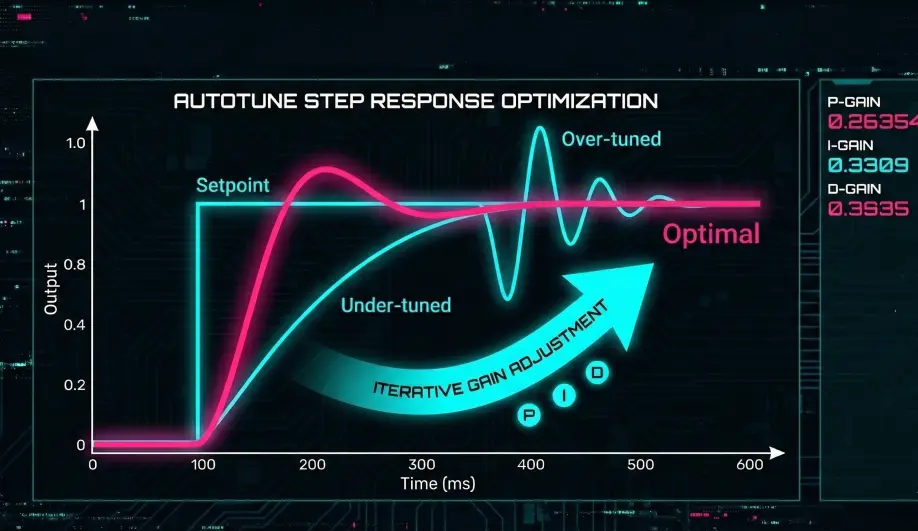
- The Theory: Every plane has a unique "Inertia" and "Control Authority." A heavy cargo plane needs more servo movement to roll than a small racer.
- The Process: When you hold the stick, the autopilot measures the Step Response (how long it takes for the plane to reach the target rate).
- The Math: It iteratively increases the P-Gain until it detects the slightest hint of oscillation, then backs off slightly. This gives you the "Tightest" possible tune without mechanical stress.
2. Time Constants (TCONST)
Instead of asking you for "PID Gains," Autotune asks you for a Response Goal (TCONST).
- A
TCONSTof 0.5 means you want the plane to reach 63% of its target angle within 0.5 seconds. - Why? This is much more intuitive for a human. You describe how you want the plane to feel, and the computer does the math to find the gains.
Hardware Dependency Matrix
The quality of the tune depends on the sensors used to measure the response.
| Sensor | Requirement | Code Implementation Notes |
|---|---|---|
| Gyroscope | CRITICAL | Measures the angular rate response. High noise levels will cause the tune to be conservative or fail. |
| Airspeed | RECOMMENDED | Highly recommended. Without airspeed, the tune is only valid for the speed at which you flew during the tune. With airspeed, the gains scale automatically across the flight envelope. |
| GPS | NONE | Not required. |
Control Architecture (Engineer's View)
AUTOTUNE is built on top of Fly-By-Wire A (FBWA).
- Flight Behavior:
- The pilot controls Bank Angle and Pitch Angle directly.
- Code Path:
ModeAutoTune::update()callsplane.mode_fbwa.update(). This confirms the flight characteristics are identical to FBWA.
- Tuning Logic:
- The tuning logic resides inside the PID controllers (
AP_RollController, etc.). - Trigger: Tuning only happens when the pilot demands a High Rotation Rate (typically > 80% stick deflection).
- Measurement: The controller measures the delay and overshoot between the Demanded Rate and the Actual Gyro Rate.
- Adjustment:
- If response is sluggish: Increase P/D gains.
- If response oscillates: Decrease P/D gains.
- Levels: The tune iterates through levels (1 to roughly 6-8) until it finds the maximum safe gains.
- The tuning logic resides inside the PID controllers (
Pilot Interaction
- Engagement: Switch to AUTOTUNE mode.
- The Procedure:
- Fly to a safe altitude.
- Roll hard left, then hard right. Repeat until the roll response feels crisp.
- Pitch up hard, then pitch down hard. Repeat.
- (Optional) Use rudder to tune Yaw.
- Saving:
- To SAVE the new gains: Switch out of AUTOTUNE while the sticks are centered.
- To DISCARD the gains: Switch out of AUTOTUNE while holding the sticks (not centered), OR simply reboot the board without switching modes.
Failsafe Logic
- Bad Tune: If the plane becomes unstable during the tune, simply switch back to Stabilize or Manual. The gains are not permanently saved until you disarm or switch modes safely.
- Reversion: ArduPilot keeps a copy of the original gains. If you toggle the switch correctly, it reverts instantly.
Key Parameters
| Parameter | Default | Description |
|---|---|---|
AUTOTUNE_LEVEL |
6 | Aggressiveness of the tune (6 is standard). Lower = softer tune. |
RLL2SRV_TCONST |
0.5 | (s) Target Time Constant for Roll. Lower = snappier roll. |
PTCH2SRV_TCONST |
0.5 | (s) Target Time Constant for Pitch. |
RLL2SRV_RMAX |
0 | Max Roll Rate (deg/s). 0 = default (usually 60-75). |
Source Code Reference
- Mode Wrapper:
ardupilot/ArduPlane/mode_autotune.cpp - Start Logic:
Plane::autotune_start()