Stabilize Mode (Copter)
Executive Summary
Stabilize Mode is the most fundamental flight mode for multicopters. It provides self-leveling attitude control on the Roll and Pitch axes, while giving the pilot direct manual control over Yaw Rate and Throttle. It is the fallback mode for almost all safety failsafes because it relies on the absolute minimum amount of sensor data.
Theory & Concepts
1. Stability vs. Agility
In control theory, Stability is the ability of a system to return to equilibrium (level). Agility is the ability to change state quickly.
- The Stabilize Trade-off: This mode is biased towards stability. The "Angle P" gain determines how hard the drone fights to return to level. If you set it too high, the drone will shake. If too low, it feels "soupy" and slow to react.
2. Manual Throttle Linearization
Human brains are good at controlling speed, but bad at controlling power.
- The Problem: As a battery drains, 50% power produces less thrust.
- The Stabilization: Even in "Manual" throttle, ArduPilot applies Voltage Compensation. It automatically increases the motor power as the battery sags, so the drone's hover position stays consistent throughout the entire flight.
Hardware Dependency Matrix
Stabilize requires only the core inertial sensors.
| Sensor | Requirement | Code Implementation Notes |
|---|---|---|
| Gyroscope | CRITICAL | Required for the Rate Controller (inner loop). |
| Accelerometer | CRITICAL | Required for the Angle Controller (outer loop) to determine "Level". |
| Compass | OPTIONAL | Heading drift may occur without it, but the mode remains flyable. |
| GPS | NONE | Not used. |
| Barometer | NONE | Not used. Throttle is manual. |
Control Architecture (Engineer's View)
Stabilize implements a standard Cascade Controller:
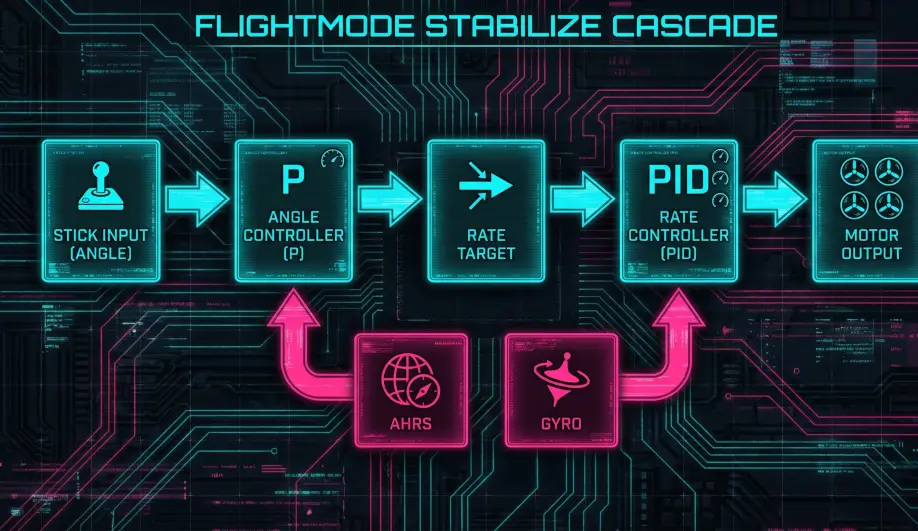
- Angle Controller (Outer Loop):
- Input: Pilot Stick Angle (e.g., 30 deg).
- Feedback: Current Estimated Angle (AHRS).
- Output: Target Rate (deg/s).
- Gain:
ATC_ANG_RLL_P/ATC_ANG_PIT_P.
- Rate Controller (Inner Loop):
- Input: Target Rate (from Outer Loop) + Pilot Yaw Rate.
- Feedback: Gyroscope Rate.
- Output: Motor PWM.
- Gain:
ATC_RAT_RLL_P/I/D.
Pilot Interaction
- Roll/Pitch: Stick deflection maps to Lean Angle.
- Center stick = 0 degrees (Level).
- Full stick =
ANGLE_MAX(default 45 degrees). - Note: The mapping is non-linear (tangent curve) to provide higher resolution near the center.
- Yaw: Stick deflection maps to Yaw Rate (deg/s).
- Throttle: Manual control.
- The output is normalized (0-1) and curve-fitted so that Mid-Stick corresponds to the Hover Throttle (
MOT_THST_HOVER). This makes hovering easier than a pure linear map.
- The output is normalized (0-1) and curve-fitted so that Mid-Stick corresponds to the Hover Throttle (
Failsafe Logic
- Attitude Loss: If the AHRS fails (E.g., high vibration confuses the accelerometer), Stabilize mode will fail to level the aircraft. This is often catastrophic.
- Battery Failsafe: Since Stabilize has no GPS, a Battery Failsafe action of "RTL" or "SmartRTL" will fail to engage. It typically downgrades to "Land".
Key Parameters
| Parameter | Default | Description |
|---|---|---|
ANGLE_MAX |
4500 | (centi-deg) Max lean angle at full stick. |
ATC_INPUT_TC |
0.15 | Time constant for smoothing stick inputs. Higher = softer feel. |
MOT_THST_HOVER |
0.35 | (0.0-1.0) The estimated throttle required to hover. The throttle curve centers around this value. |
Source Code Reference
- Mode Logic:
ardupilot/ArduCopter/mode_stabilize.cpp - Control Loop:
ModeStabilize::run()
Practical Guide: Tuning Stabilize
The default tuning is designed for large, slow drones. For small, agile quads, it feels terrible.
1. Increase the Angle Limit
- Parameter:
ANGLE_MAX - Default: 4500 (45 degrees).
- Tuning: Increase to 5500 (55 deg) or 6000 (60 deg). This allows you to fly faster and fight strong winds.
2. Tighten the Outer Loop
If the drone feels "lazy" (slow to start tilting), increase the Angle P-Gain.
- Parameter:
ATC_ANG_RLL_P/ATC_ANG_PIT_P - Default: 4.5.
- Tuning: Try 6.0. This makes the self-leveling reaction much snappier.
3. Rate vs. Angle
Don't confuse them.
- Oscillates ONLY when you let go of the stick:
ATC_ANG_RLL_Pis too high (Angle Loop). - Oscillates ALL the time:
ATC_RAT_RLL_PorDis too high (Rate Loop).