Land Mode (Copter)
Executive Summary
Land Mode initiates a vertical descent to the ground. Its primary goal is to bring the vehicle down safely, detecting the ground to shut off motors automatically. It adapts its behavior based on sensor availability, offering a Position-Controlled descent if GPS is healthy, or a simple Level-Descent if not.
Theory & Concepts
1. Ground Effect
When a drone gets close to the ground (within one rotor diameter), its own downwash creates a "cushion" of high-pressure air.
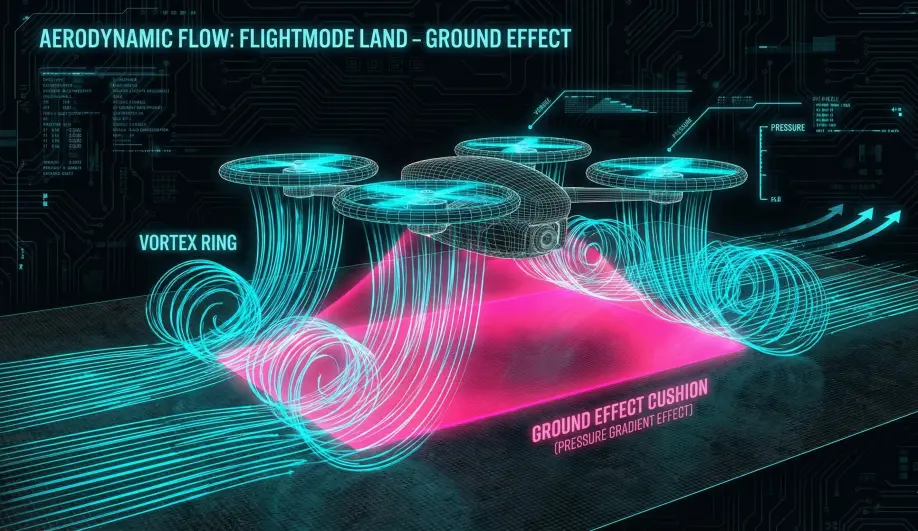
- The Problem: This cushion can make the drone "float" or bounce, confusing the Land Detector.
- The Solution: The Land Mode uses a specific Descent Rate Controller that ignores the floatiness and forces the drone down at a constant
LAND_SPEED.
2. Barometric Ground Suction
A fast-descending drone creates a low-pressure zone above its propellers. If the barometer is mounted poorly, it might see this as an "Altitude Increase," causing the drone to speed up its descent. ArduPilot's EKF uses accelerometer data to reject these barometric "Lies" during the final landing phase.
Hardware Dependency Matrix
Land mode is designed to work with whatever sensors are available, degrading gracefully.
| Sensor | Requirement | Code Implementation Notes |
|---|---|---|
| Barometer | REQUIRED | Primary source for altitude and descent rate control. |
| GPS | OPTIONAL | If available, the descent is position-locked (stops wind drift). If lost, the vehicle drifts with the wind while descending. |
| Rangefinder | RECOMMENDED | Drastically improves the "Slow Down" logic. Without it, the vehicle assumes Barometer altitude is accurate, which can be risky near the ground. |
| Compass | OPTIONAL | Required only for the GPS-assisted (Loiter-style) descent. |
Control Architecture (Engineer's View)
Land Mode logic splits into two distinct paths in ModeLand::run().
- GPS Run (
gps_run):- Acts like Loiter Mode but with a forced descent.
- The horizontal controller actively fights wind to stay over the landing point.
- No-GPS Run (
nogps_run):- Acts like Stabilize Mode (self-leveling) but with a forced descent.
- The vehicle will drift with the wind. The pilot must manually correct pitch/roll to avoid hitting obstacles.
Vertical Descent Profile
The descent is not a single speed; it is a multi-stage profile managed by land_run_vertical_control.
- Fast Descent: The vehicle descends at
WPNAV_SPEED_DN(default 150 cm/s). - Slow Down: When the vehicle thinks it is 10 meters (
LAND_ALT_LOW) above the ground (or home), it slows toLAND_SPEED(default 50 cm/s).- Critical Note: If you take off from a hill and fly over a valley, the Barometer thinks you are high up. The drone may descend fast until it smashes into the ground because it didn't know the ground came up. Rangefinders solve this.
Pilot Interaction
- Repositioning: If
LAND_REPOSITIONis enabled (default), the pilot can use the Pitch/Roll sticks to move the drone horizontally during the descent.- In GPS mode, this feels like "nudging" the landing point.
- In No-GPS mode, this feels like flying in Stabilize.
- Throttle: Pilot throttle input is ignored (unless repositioning logic overrides it in specific setups), as the Z-controller is fully automated.
Failsafe Logic
- Landing Detector: The motors will not disarm until the Landing Detector logic confirms touchdown. It looks for:
- Vertical Velocity near zero.
- Throttle command at minimum.
- Rotation rates near zero.
- If the drone is bouncing (AirMode issue) or "floating" (Ground Effect), it may refuse to disarm.
Key Parameters
| Parameter | Default | Description |
|---|---|---|
LAND_SPEED |
50 | (cm/s) Final descent speed. Lower is safer for landing gear. |
LAND_ALT_LOW |
1000 | (cm) Altitude at which to switch to LAND_SPEED. |
LAND_REPOSITION |
1 | (0/1) Enable pilot stick input to move horizontally during landing. |
WPNAV_SPEED_DN |
150 | (cm/s) Initial fast descent rate. |
Source Code Reference
- Mode Logic:
ardupilot/ArduCopter/mode_land.cpp - GPS Path:
ModeLand::gps_run()
Practical Guide: Tuning the Land Detector
Does your drone "bounce" on the ground and refuse to disarm? Or disarm in mid-air?
The Bounce (Refusal to Disarm)
- Cause: The drone touches down, but the "Ground Effect" turbulence makes the gyro noisy. The Land Detector thinks "I'm still moving!" and keeps the motors running.
- Fix 1: Lower
LAND_SPEED. If you hit the ground gently (30 cm/s), there is less shock. - Fix 2: Disable AirMode (
RCx_OPTION = 84). AirMode is the #1 cause of landing bounces.
The False Landing (Mid-Air Disarm)
- Cause: You are descending fast in a lightweight drone. The throttle is at minimum. The wind catches the drone, momentarily stopping its descent. The detector thinks "Zero throttle + Zero Velocity = Ground".
- Fix: Ensure
DISARM_DELAYis > 0. - Fix: Avoid zero-throttle dives in Stabilize mode if you have a sensitive land detector. Use Acro (which ignores land detection) for diving.