Altitude Hold (Copter)
Executive Summary
Altitude Hold (AltHold) is a semi-autonomous flight mode that automatically maintains a consistent Z-axis altitude while allowing the pilot to manually control roll, pitch, and yaw. It acts as a "cruise control" for height, relieving the pilot of throttle management.
Theory & Concepts
1. Z-Axis Physics: The Gravity Neutral Point
To hold altitude, the drone must produce exactly enough thrust to counter gravity.
- The Problem: Battery voltage drops during flight, and air density changes with height. "50% Throttle" does not produce a constant amount of lift.
- The Solution: The Altitude Controller learns the Hover Throttle (
MOT_THST_HOVER) dynamically. It continuously calculates the "Neutral Point" where the drone neither climbs nor falls.
2. Barometric Drift vs. Inertial Certainty
Barometers are sensitive to noise. If you rely solely on a barometer, the drone will "bounce" as the air pressure fluctuates.
- Fusion: ArduPilot fuses the Barometer with the Z-Accelerometer.
- The Logic: The Accelerometer detects instant changes (e.g., "I just dropped 5cm!"), while the Barometer provides the long-term truth (e.g., "I am 10m high"). This fusion creates a smooth, lag-free altitude hold.
Hardware Dependency Matrix
Unlike Stabilize or Acro, this mode depends heavily on a Z-axis estimator.
| Sensor | Requirement | Code Implementation Notes |
|---|---|---|
| Barometer | REQUIRED | Primary source for altitude estimation. If the barometer drifts (e.g., due to light hitting it or air pressure changes), the drone will drift vertically. |
| Accelerometer | CRITICAL | Used for inertial navigation to fuse with barometer data for a low-latency Z-estimate. |
| Rangefinder | OPTIONAL | If installed and enabled (RNGFND_GAIN > 0), the EKF can use it for low-altitude precision, but the mode falls back to Baro seamlessly. |
| GPS | NONE | Not required. Ideal for indoor flight. |
Control Architecture (Engineer's View)
AltHold is effectively two different modes running simultaneously:
- Horizontal (X/Y): Stabilize Mode
- Pilot Roll/Pitch sticks map directly to Lean Angle (e.g., 45 degrees).
- When sticks are centered, the vehicle self-levels.
- Note: It does not hold horizontal position; it will drift with the wind.
- Vertical (Z): Velocity Controller
- Pilot Input: The throttle stick commands a Climb Rate (cm/s), not a motor power level.
- The Cascade:
- Input:
get_pilot_desired_climb_rate()converts stick position to target velocity. - Velocity Loop: Compares target vs actual climb rate. Error feeds into...
- Accel Loop: Compares target vs actual Z-acceleration. Error feeds into...
- Motor Mixer: Final throttle output.
- Input:
Pilot Interaction & Deadzone
The throttle behavior is defined by the Deadzone (THR_DZ).
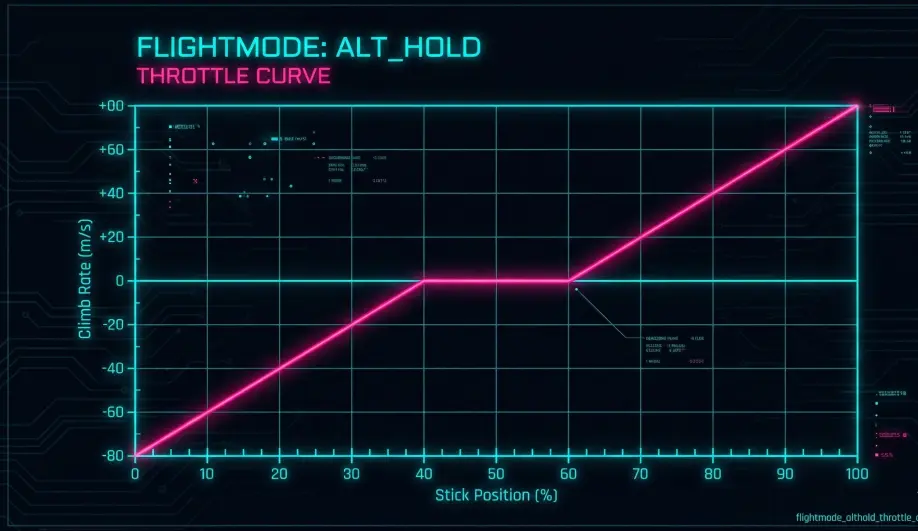
- Center Stick (Deadzone): When the throttle is within the deadzone (typically 40%-60%), the target climb rate is forced to 0. The controller locks the current altitude.
- Outside Deadzone: The stick commands a linear climb/descent rate up to
PILOT_SPEED_UP(default 250 cm/s) orPILOT_SPEED_DN. - Tactile Feel: This creates a "sticky" feel at center, allowing you to let go of the throttle without the drone falling.
Failsafe & Safety Logic
- Vibration Sensitivity: Because the Z-controller relies heavily on the Accelerometer (Z-axis) to react fast, high vibrations can cause AltHold to fail.
- Symptom: The drone shoots up (Skyrocket) when engaging AltHold.
- Cause: Aliasing of vibration noise into the Z-accel signal makes the EKF think the drone is falling, so it applies max throttle.
- Barometer Glitches: Sudden pressure changes (opening a door, sunlight hitting the sensor) can cause jumpy altitude corrections.
Key Parameters
| Parameter | Default | Description |
|---|---|---|
PILOT_SPEED_UP |
250 | Max climb rate (cm/s) at full throttle. |
PILOT_SPEED_DN |
0 | Max descent rate (cm/s) at zero throttle. 0 means it matches SPEED_UP. |
THR_DZ |
100 | Size of the deadzone (in PWM/10). 100 = +/- 10% around mid-stick. |
PSC_POSZ_P |
1.0 | Position Z P-gain. Converts altitude error to target velocity. |
PSC_VELZ_P |
5.0 | Velocity Z P-gain. Converts velocity error to target acceleration. |
Tuning & Troubleshooting
| Symptom | Probable Cause | Corrective Action |
|---|---|---|
| "Rocketing" Upwards | High Z-axis Vibrations. | Check prop balance, secure flight controller. Check [VIBE](/field-manual/log-analysis/vibration-analysis.html).VibZ in logs. |
| Yo-Yo (Oscillation) | PSC_VELZ_P too high. |
Reduce Velocity P gain. |
| Drifts Down/Up slowly | Barometer light sensitivity or inadequate "Hover Throttle" learning. | Cover barometer with foam. Ensure MOT_THST_HOVER is learning (MOT_HOVER_LEARN). |
Source Code Reference
- Mode Logic:
ardupilot/ArduCopter/mode_althold.cpp - Pilot Input Logic:
Copter::get_pilot_desired_climb_rate() - Loop Structure:
ModeAltHold::run()callspos_control->update_z_controller().