AP_Motors - The Matrix & Mixer
Executive Summary
The Motor Mixer (AP_MotorsMatrix) is the bottom layer of the control stack. It takes the normalized Torque (Roll/Pitch/Yaw) and Thrust (Throttle) commands from the Rate Controller and translates them into physical PWM signals for each motor. It handles the geometry of the frame (Quad, Hex, Octo) and manages "Motor Saturation" to prioritize stability over altitude.
Theory & Concepts
1. Torque Balancing
A quadcopter rotates by changing the torque balance of its motors.
- Pitch/Roll: Done by changing the relative Thrust (Vertical Force) between opposite motors.
- Yaw: Done by changing the relative Torque (Clockwise vs Counter-Clockwise rotation) of the motors.
- The Matrix: This is a mathematical map of which motor does what. If a frame is perfectly symmetrical, the factors are simple (0.5, 1.0). If the frame is asymmetric (like a Deadcat), the factors must be calculated to prevent "Coupling" (e.g., rolling causing a slight pitch).
2. Motor Saturation & Priority
What if you are at 100% throttle and you want to roll?
- Priority 1: Attitude. The mixer will actually reduce the throttle of some motors below 100% to create the torque needed for the roll.
- Result: The drone might lose altitude, but it will not crash. Stability is always prioritized over altitude.
Architecture (The Engineer's View)
1. The Mixing Matrix
Each motor has a set of "Factors" based on its physical location.
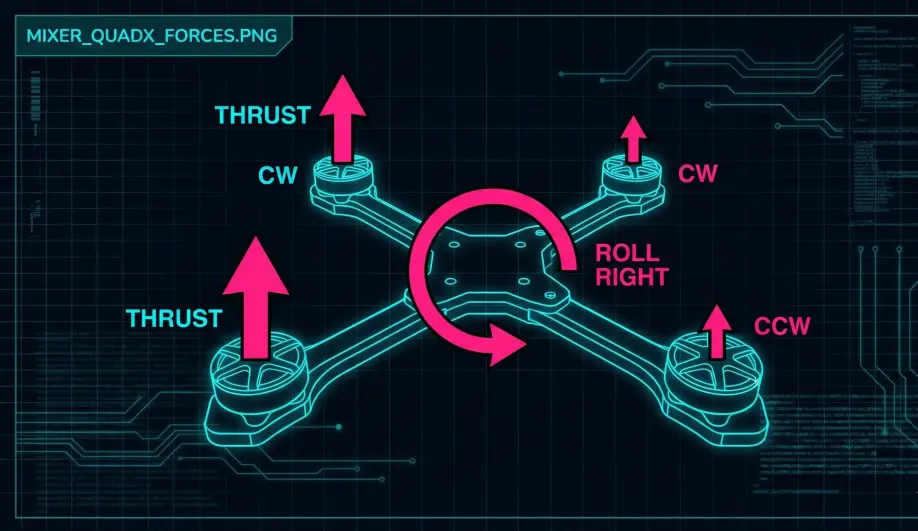
- Formula:
Motor_Output = (Roll_In * Roll_Factor) + (Pitch_In * Pitch_Factor) + (Yaw_In * Yaw_Factor) + Throttle_In - Example (Quad X, Motor 1 - Front Right):
- Roll Factor: -0.5 (Spin down to roll right).
- Pitch Factor: -0.5 (Spin down to pitch forward).
- Yaw Factor: -1.0 (Spin down to yaw CW).
2. The Stability Patch (Handling Saturation)
What happens if the drone is at 90% Throttle, and the Stability Controller demands +30% Roll?
- Math: 90% + 30% = 120%.
- Reality: Motors max out at 100%. If we just clip it, the drone won't roll enough, and it will crash.
- The Solution: The mixer automatically lowers the average throttle to make room for the roll command.
- Result: The drone climbs slower (or descends), but it always maintains the commanded attitude. Attitude is king.
3. Thrust Linearization
ESC/Motor combos are not linear. 50% PWM does not equal 50% Thrust (usually it's only ~25% Thrust).
- Problem: If the autopilot assumes linear thrust, PIDs will be too weak at low throttle and too aggressive at high throttle (oscillations).
- Correction:
MOT_THST_EXPO(default 0.65). - Logic: The mixer applies an inverse quadratic curve to linearized the output before sending it to the ESC.
Key Parameters
| Parameter | Default | Description |
|---|---|---|
MOT_SPIN_ARM |
0.10 | (10%) Motor speed when armed (Zero throttle). Keeps props spinning for air-mode authority. |
MOT_SPIN_MIN |
0.15 | (15%) Minimum speed during flight. Prevents motor desyncs. |
MOT_THST_EXPO |
0.65 | Thrust curve linearization. |
MOT_PWM_TYPE |
0 | 0=Normal, 4=DShot150, 6=DShot600. |
Source Code Reference
- Mixing Logic:
AP_MotorsMatrix::output_armed_stabilizing()
Practical Guide: Verifying Mixer Order & Direction
Getting the motors plugged in wrong or spinning the wrong way is the #1 cause of "Instant Flip on Takeoff."
The "Motor Test" (Software Order)
This verifies that "Motor 1" in code matches "Motor 1" on the frame.
- Remove Props.
- Connect Mission Planner -> Setup -> Optional Hardware -> Motor Test.
- Click Test Motor A (which is Motor 1).
- Expectation: The Front-Right motor should spin.
- If Front-Left spins: You have a wiring swap. Check your servo output map (
SERVO1_FUNCTION, etc.).
- Proceed through B, C, D in clockwise order (usually A=FR, B=BR, C=BL, D=FL for Quad X).
The "MotoSpin" (Hardware Direction)
This verifies the physical spin direction without needing a piece of paper.
- Props OFF.
- Enable DShot (
MOT_PWM_TYPE= 4, 5, or 6). - Use the "MotoSpin" feature (if supported by your GCS/ESC Passthrough) OR simply hold a piece of paper against the motor bell during the "Motor Test."
- Paper pushes away: Correct.
- Paper gets sucked in: Wrong direction.
- Fixing Direction:
- DShot: Use Bi-directional DShot Passthrough to reverse the motor in the BLHeli/Bluejay settings. You do not need to swap wires.
- PWM: Swap any two motor wires.
For full frame diagrams, see the ArduPilot Wiki: Connect ESCs and Motors.