AC_PosControl - The XYZ Controller
Executive Summary
The Position Controller (AC_PosControl) is the "Middle Manager" of the flight stack. It takes orders from the Navigator ("Go to [10, 20, 5]") and converts them into orders for the Attitude Controller ("Lean Forward 5 degrees"). It handles the physics of moving a mass through space by cascading Position, Velocity, and Acceleration loops.
Theory & Concepts
1. The Inverted Pendulum
A multicopter is essentially an Inverted Pendulum.
- The Physics: To move forward, you must first tilt the thrust vector.
- The Lag: There is a physical delay between "I want to move" and "The drone is tilted and producing horizontal force."
- The Solution: The Position Controller uses FeedForward Acceleration. It doesn't just wait for the drone to drift; it commands the tilt required to achieve the target velocity immediately.
2. P-PID Cascade Tuning
The "Cascade" allows for granular control.
- Outer P-Gain: Handles the "Snap" to the position.
- Inner PID-Gain: Handles the "Damping" of the motion.
- Key Logic: If you have "Overshoot" (drone flies past the point and comes back), your Velocity P is too high relative to your Position P.
Architecture (The Engineer's View)
1. The Horizontal Cascade (XY)
To move the drone, we must lean it.
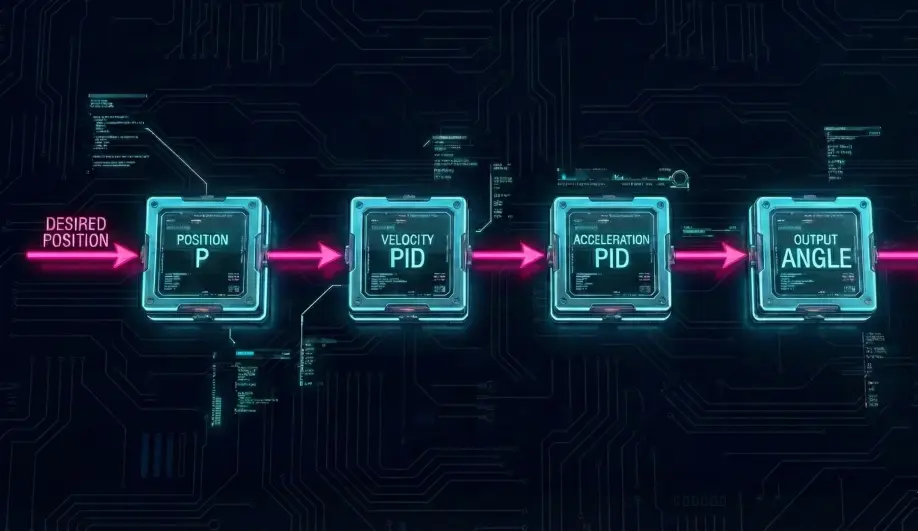
- Position Loop:
Position_Error = Target_Pos - Current_PosTarget_Velocity = Position_Error * P_Gain
- Velocity Loop:
Velocity_Error = Target_Velocity - Current_VelocityTarget_Accel = PID(Velocity_Error)
- Acceleration-to-Angle:
- To accelerate forward at
1g, you must lean forward 45 degrees. - Formula:
Lean_Angle = atan(Target_Accel / Gravity) - Result: Target Roll and Pitch angles are sent to
AC_AttitudeControl.
- To accelerate forward at
2. The Vertical Cascade (Z)
To change altitude, we must change motor thrust.
- Position Loop:
Altitude_Error->Target_Climb_Rate. - Velocity Loop:
Climb_Rate_Error->Target_Z_Accel. - Acceleration Loop:
Accel_Error->Throttle_Output (0-1).
Why this matters for Tuning
- "Toilet Bowling": If the XY Velocity PID is too aggressive (or compass is bad), the drone overshoots the target velocity, leans back too hard, stops, leans forward again, and starts circling the target.
- "Yo-Yo" Altitude: If the Z Velocity P-Gain is too high, the drone oscillates up and down because it reacts too violently to small climb rate errors.
Key Parameters
| Parameter | Default | Description |
|---|---|---|
PSC_POSXY_P |
1.0 | Position P-Gain. Converts distance error to speed. |
PSC_VELXY_P |
2.0 | Velocity P-Gain. Converts speed error to acceleration. |
PSC_POSZ_P |
1.0 | Altitude P-Gain. |
PSC_VELZ_P |
5.0 | Climb Rate P-Gain. |
Source Code Reference
- XY Controller:
AC_PosControl::update_xy_controller() - Z Controller:
AC_PosControl::update_z_controller()
Practical Guide: Tuning for Wind Hold
If your drone gets pushed around by wind in Loiter mode, or oscillates (twitches) when hovering in wind, you need to tune the Velocity Loop.
1. The Twitch (High P)
- Symptom: Drone hovers generally well but makes rapid, jerky twitching corrections in wind.
- Diagnosis:
PSC_VELXY_Pis too high. The controller is reacting to every tiny gust with a hard lean. - Fix: Reduce
PSC_VELXY_Pfrom 2.0 to 1.5.
2. The Drift (Low I)
- Symptom: Drone holds position in calm air, but in steady wind, it drifts 2-3 meters downwind and stays there.
- Diagnosis: Low
PSC_VELXY_I. The P-term isn't strong enough to hold against constant wind pressure. - Fix: Increase
PSC_VELXY_I. The Integral term will accumulate the error and slowly lean the drone further into the wind until the drift stops.
3. The Overshoot (Balance)
- Symptom: You let go of the stick, and the drone flies past the stopping point, brakes hard, and flies back.
- Fix: Reduce
PSC_POSXY_P(the "Approach Speed") or IncreasePSC_VELXY_D(the "Braking Damping").