AC_AttitudeControl - The Angle Controller
Executive Summary
The Attitude Controller is responsible for determining how fast the vehicle should rotate to achieve a desired Orientation (Roll, Pitch, Yaw). It sits between the Position Controller (which demands angles) and the Rate Controller (which demands motor torque). It uses sophisticated "Input Shaping" to ensure the vehicle rotates smoothly without overshooting or exceeding physical acceleration limits.
Theory & Concepts
1. Angular Acceleration & Centripetal Force
When a drone rotates, it has to overcome the Inertia of the frame and the Gyroscopic Effect of the spinning propellers.
- The Constraint: Every vehicle has a physical limit on how fast it can rotate (
ATC_ACCEL_R_MAX). - The Math: If you command a 90 deg/s roll instantly, the Attitude Controller won't just ask for 90 deg/s. It will ramp the request from 0 to 90 using a trajectory that respects the frame's acceleration limit.
2. Quaternion vs. Euler Angles
- Euler Angles (Roll, Pitch, Yaw): Easy for humans to understand, but they suffer from Gimbal Lock at 90 degrees.
- Quaternions: A 4-dimensional representation of rotation. They are mathematically superior, have no Gimbal Lock, and are used internally by ArduPilot for all calculations.
- Conversion: ArduPilot takes your Euler inputs (sticks) and converts them to a Target Quaternion. The error between the Current Quaternion and Target Quaternion is what drives the rotation rate.
Architecture (The Engineer's View)
1. Input Processing (input_euler_angle_...)
- Source: Comes from Pilot Stick (Stabilize mode) or PosControl (Loiter/Auto mode).
- Format: Target Euler Angles (e.g., Roll 30 degrees, Pitch -10 degrees).
- Yaw: Usually passed as a Rate (deg/s), not an Angle, unless in a specific Heading Hold mode.
2. Input Shaping (The Square Root Controller)
A standard PID controller is bad at handling large angle errors (step inputs). If you command a 45-degree roll instantly, a P-Controller would demand infinite rotation speed.
ArduPilot uses a Square Root Controller for the angle loop.
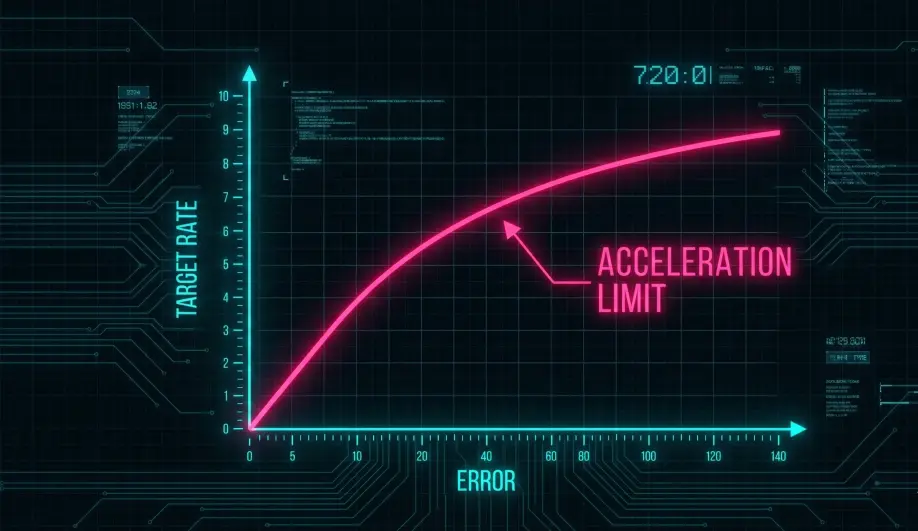
- Logic: It calculates the maximum velocity the vehicle can reach and still stop in time given its acceleration limit (
ATC_ACCEL_R_MAX). - Result:
- Small Error: Behaves like a linear P-Controller.
- Large Error: Behaves like a constant-acceleration trajectory generator.
- Benefit: Crisp response to small stick movements, but smooth, non-overshooting response to full-stick "bangs".
3. Output Generation
- Target:
_ang_vel_target(Vector3f). - Type: Body-Frame Angular Velocity (Radians/second).
- Handoff: These targets are passed down to the Rate Controller (
AC_AttitudeControl_Multi).
Key Parameters
| Parameter | Default | Description |
|---|---|---|
ATC_ANG_RLL_P |
4.5 | Roll Angle P-Gain. Higher = Snappier response, Lower = Softer. |
ATC_ACCEL_R_MAX |
110000 | (centi-deg/s/s) Max rotational acceleration. |
ATC_INPUT_TC |
0.15 | Time Constant. Filters the pilot's stick input to make it feel "heavier" or "lighter". |
Source Code Reference
- Input Function:
AC_AttitudeControl::input_euler_angle_roll_pitch_euler_rate_yaw() - Shaper Logic:
AC_AttitudeControl::input_shaping_angle()
Practical Guide: Tuning for Sharpness
If your drone feels "Laggy" in Stabilize mode (it follows your sticks but feels slow to start moving), you need to tune the Angle Controller.
Step 1: The Snap (ATC_ANG_RLL_P)
This parameter controls how aggressively the drone tries to close the gap between your stick angle and the actual angle.
- Default: 4.5
- Race Drones: Increase to 6.0 - 8.0. It will feel much more connected.
- Cinematic: Decrease to 3.5. It will feel smoother.
- Warning: If you go too high (>10), the drone will oscillate (wobble) as it tries to level out.
Step 2: The Acceleration (ATC_ACCEL_R_MAX)
This limits how fast the rotation speed can change.
- Default: 110000 (1100 deg/s/s).
- Optimization: Set this to
0(Disabled). This lets the drone accelerate as fast as the motors physically allow. This is standard for 5" freestyle quads. - Cinematography: Keep it at default or lower (50000) to smooth out jerky stick inputs.
Step 3: The Feel (ATC_INPUT_TC)
This is an input filter.
- Default: 0.15 (s).
- Crisp: Reduce to 0.10 or 0.08. This removes the "Robot" feel and makes the drone track your stick instantly.