Auto Mode (Copter)
Executive Summary
Auto Mode is the primary autonomous flight mode, executing a pre-programmed mission plan uploaded to the flight controller. It navigates through a series of 3D waypoints using a sophisticated trajectory generation system (SCurves) to ensure smooth, cinematic motion. It is the "brain" of commercial operations, handling everything from takeoff to landing without pilot input.
Theory & Concepts
1. 3D Waypoint Navigation
Waypoint navigation is more than just flying from A to B. It requires solving a 3D path problem.
- The Problem: Drones have inertia. They cannot turn 90 degrees instantly.
- The Solver: ArduPilot calculates a Path Trajectory. It "leads" the drone by placing a target point slightly ahead of the actual position.
- SCurves: By using S-Curve math, the drone accelerates and decelerates like a smooth cinematic camera rig rather than a jerky robot.
2. The Acceptance Radius
How does the drone know it "Reached" a waypoint?
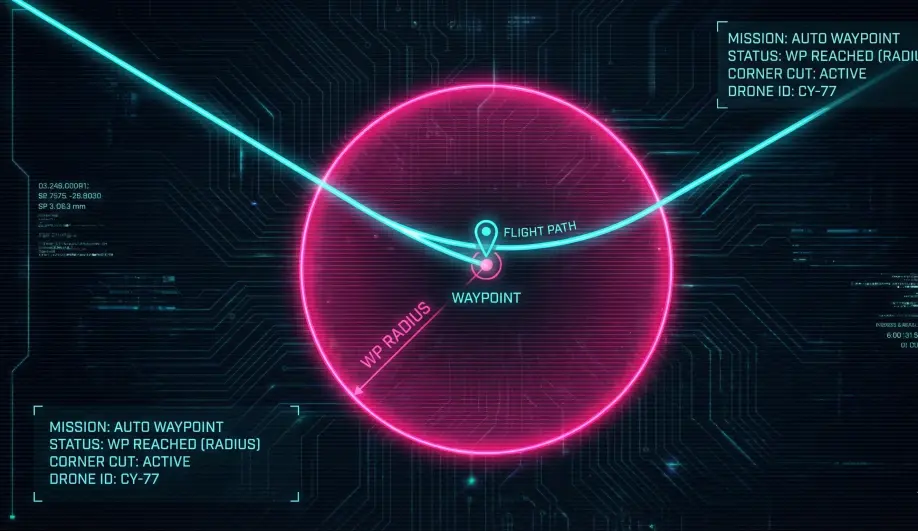
- The Zone:
WPNAV_RADIUSdefines a sphere around the point. - The Logic: Once the drone enters this sphere, the navigator immediately begins "Blended Tracking" towards the next point. This allows the drone to carry its speed through the turn rather than coming to a full stop.
Hardware Dependency Matrix
Auto mode relies entirely on the vehicle's ability to know where it is in the world.
| Sensor | Requirement | Code Implementation Notes |
|---|---|---|
| GPS | CRITICAL | Requires a 3D Lock and a healthy EKF position estimate. Loss of GPS triggers a failsafe (usually Land or AltHold). |
| Compass | CRITICAL | Accurate heading is required for navigation. EKF compass variance errors will prevent mode engagement. |
| Barometer | REQUIRED | Primary source for relative altitude (AGL). |
| Rangefinder | OPTIONAL | Can be used for "Terrain Following" missions (TERRAIN_ENABLE), keeping the drone at a fixed height above ground. |
Control Architecture (Engineer's View)
Auto Mode is unique because it is a Meta-Mode containing its own internal state machine.
- The Sub-Mode Machine:
- Unlike other modes,
ModeAuto::run()acts as a dispatcher. - It switches between internal states:
TAKEOFF,WP(Waypoint),LAND,RTL,CIRCLE,LOITER,PAYLOAD_PLACE. - Code Path:
ModeAuto::run().
- Unlike other modes,
- Trajectory Generator (SCurves):
- ArduPilot uses SCurve navigation (S-shaped velocity profiles).
- Instead of flying straight lines with sharp stops, it calculates a jerk-limited path. This means the drone accelerates smoothly, cruises, and decelerates smoothly into corners.
- Benefit: Cinematic video and reduced mechanical stress.
- Mission Command Handler:
- The
AP_Missionlibrary feeds commands (e.g.,MAV_CMD_NAV_WAYPOINT) to the mode. - The mode interprets these commands and updates the
AC_WPNavtargets.
- The
Pilot Interaction & Overrides
Even in Auto, the pilot is not necessarily locked out. This is controlled by Stick Mixing.
- Yaw Override: By default, the pilot can manually yaw the vehicle while it flies the mission path. This is useful for pointing a camera. (Disable with
AUTO_OPTIONSbit 2). - Speed Nudging: In some configurations, the pitch stick can speed up or slow down the mission execution.
- Landing Repositioning: If
LAND_REPOSITIONis enabled, the pilot can use the roll/pitch sticks during the final landing phase to "nudge" the drone away from obstacles.
Failsafe Logic
- GPS Failsafe: If the EKF loses position confidence (GPS Glitch or Loss), the vehicle will immediately switch to Land (if
FS_EKF_ACTIONis 1) or AltHold (if 3). This is a critical safety behavior to understand: the drone will stop navigating. - GCS Failsafe: If the mission continues beyond radio range, the drone continues unless
FS_GCS_ENABLEis set to "RTL". For autonomous missions, GCS failsafe is often disabled.
Key Parameters
| Parameter | Default | Description |
|---|---|---|
WPNAV_SPEED |
500 | Default horizontal speed (cm/s) between waypoints. |
WPNAV_ACCEL |
100 | Max acceleration ($cm/s^2$). Lower values make starts/stops smoother. |
AUTO_OPTIONS |
0 | Bitmask options. Bit 2: Ignore Pilot Yaw (locks heading to mission). |
WPNAV_RADIUS |
200 | (cm) The radius around a waypoint at which the drone considers the point "reached" and begins the turn to the next point. |
RTL_AUTOLAND |
0 | Time (ms) to wait at the final waypoint. |
Tuning & Troubleshooting
| Symptom | Probable Cause | Corrective Action |
|---|---|---|
| "Stop-and-Go" at Waypoints | The vehicle stops at every point instead of flowing. | Increase WPNAV_RADIUS. If the turn radius is too tight for the speed, it must stop to turn. |
| Overshooting Corners | WPNAV_ACCEL too low or Speed too high. |
Increase Accel or reduce Speed to allow the drone to corner tighter. |
| Jerky Yaw turns | ATC_ACCEL_Y_MAX too high. |
Reduce Yaw Acceleration max to smooth out automated heading changes. |
Source Code Reference
- Mode Logic:
ardupilot/ArduCopter/mode_auto.cpp - Waypoint Runner:
ModeAuto::wp_run()
Practical Guide: Tuning for Cinematic Waypoints
Default ArduPilot tuning is "Safe" (robotic). For cinematic video, you need to soften the edges.
1. Smooth the Corners
If the drone stops at every waypoint, your video looks robotic.
- Parameter:
WPNAV_RADIUS - Default: 200 (2m).
- Tuning: Increase to 300 - 500 (3-5m). This tells the drone to start cutting the corner earlier, maintaining momentum.
2. Remove the "Jerk"
"Jerk" is the change in acceleration. High jerk causes gimbal micro-shakes.
- Parameter:
WPNAV_JERK - Default: 1 ($1 m/s^3$).
- Tuning: Reduce to 0.5. This makes the drone ramp up its speed very slowly, like a train leaving a station.
3. Vertical Smoothness
The default vertical acceleration is quite aggressive ($100 cm/s^2$).
- Parameter:
WPNAV_ACCEL_Z - Default: 100.
- Tuning: Reduce to 50 - 70. This prevents the drone from "popping" up to altitude, making elevation changes feel like a gentle elevator.