Circle Mode (Copter)
Executive Summary
Circle Mode is an autonomous flight mode that makes the vehicle orbit a specific point of interest (POI). It allows for smooth, cinematic orbital shots with the nose of the aircraft (and camera) locked onto the center. It supports dynamic pilot adjustments to the radius and speed during flight.
Theory & Concepts
1. Centripetal Force in Flight
To fly in a circle, a drone must constantly accelerate towards the center of that circle.
- The Physics: The drone's total thrust vector must provide two components:
- Vertical: To stay in the air (counter gravity).
- Horizontal (Radial): To provide the centripetal force needed for the turn.
- The Result: This is why a drone Banks into a turn. The steeper the bank, the more horizontal force is generated, allowing for a tighter or faster circle.
2. POI Orientation
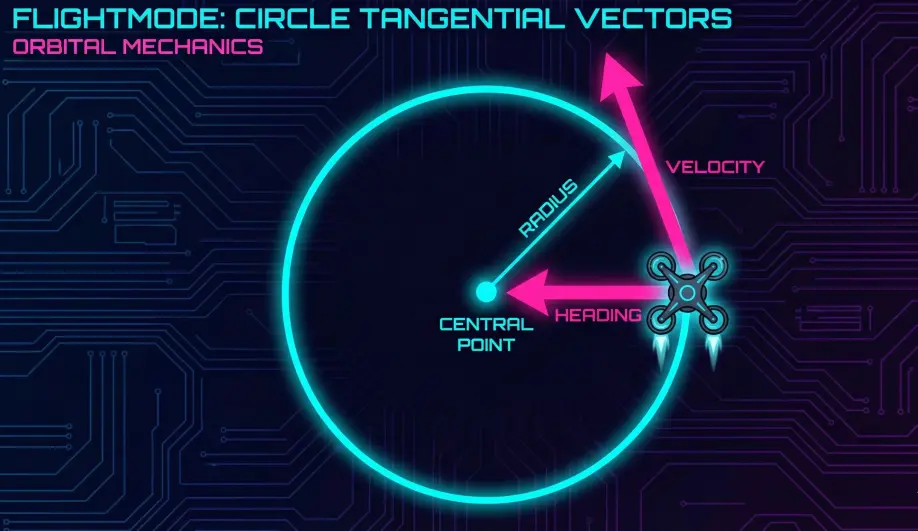
Unlike standard flight where the "forward" direction is where the nose points, in Circle mode, the "forward" direction is Tangential to the circle. ArduPilot automatically manages the Yaw so that the nose always points at the center, creating a "Satellite" perspective of the target.
Hardware Dependency Matrix
Like Loiter, Circle relies on precise positioning to maintain its orbit.
| Sensor | Requirement | Code Implementation Notes |
|---|---|---|
| GPS | CRITICAL | Requires a valid position estimate to calculate the orbital path. |
| Compass | CRITICAL | Required for heading control (keeping the nose pointed at the center). |
| Barometer | REQUIRED | Used for altitude hold (Z-axis). |
Control Architecture (Engineer's View)
Circle Mode delegates its navigation logic to the AC_Circle library.
- Center Point Calculation:
- By default, when you engage Circle mode, the "Center" is calculated as a point one radius distance in front of the vehicle. This means the drone will effectively fly "around" the object you were looking at.
- Option: If
CIRCLE_OPTIONSbit 2 is set (INIT_AT_CENTER), the current location becomes the center, and the drone flies out to the radius.
- Trajectory Generation:
- The
AC_Circlelibrary maintains an internal angular state (_angle). - It calculates a target position on the perimeter based on
_angleand_radius. - It feeds a Velocity Target to the
PosControllibrary to drive the vehicle along the tangent of the circle.
- The
- Yaw Control:
- The autopilot automatically calculates the bearing to the center point and locks the Yaw target to that bearing.
- Panorama Mode: If Radius is 0, the vehicle stays in place and simply rotates (Panorama).
Pilot Interaction
If CIRCLE_OPTIONS bit 0 is enabled (Manual Control, default ON), the pilot can modify the orbit in real-time:
- Pitch Stick: Modifies the Radius.
- Pitch Forward: Reduces radius (spirals in).
- Pitch Back: Increases radius (spirals out).
- Roll Stick: Modifies the Angular Rate (Speed).
- Roll Right: Increases clockwise speed.
- Roll Left: Increases counter-clockwise speed (or slows down/reverses).
- Throttle: Standard Altitude Hold (Climb Rate control).
Failsafe Logic
- GPS Loss: The vehicle cannot maintain the orbit. It will likely trigger an EKF failsafe (Land or AltHold).
- Crash Risk: If the radius is reduced to zero while moving fast, the centripetal acceleration requirement drops, but the vehicle enters "Panorama" mode (spinning in place).
Key Parameters
| Parameter | Default | Description |
|---|---|---|
CIRCLE_RADIUS |
1000 | (cm) Default radius of the orbit (10m). |
CIRCLE_RATE |
20 | (deg/s) Default angular speed. Positive = Clockwise, Negative = CCW. |
CIRCLE_OPTIONS |
1 | Bitmask. Bit 0: Manual Control (Sticks adjust orbit). Bit 1: Face direction of travel. Bit 2: Init at Center. |
Source Code Reference
- Mode Logic:
ardupilot/ArduCopter/mode_circle.cpp - Library Logic:
AC_Circle::update()
Practical Guide: Dynamic Orbiting
The beauty of Circle Mode is that it isn't static. You can "Fly" the orbit.
1. The Entry
- Fly towards your subject (e.g., a tree).
- Stop about 10m away, facing the tree.
- Switch to Circle Mode.
- Result: The drone will calculate the center to be 10m directly in front of you (where the tree is) and start orbiting.
2. The Spiral (Advanced Shot)
You can create a cinematic "reveal" shot by spiraling out.
- While orbiting, Pull Pitch Back gently.
- Effect: The radius increases smoothly. The drone spirals away from the subject while keeping it in frame.
3. Speed Control
- Push Roll Right: Speed up (Orbital Velocity increases).
- Push Roll Left: Slow down, stop, or reverse direction.
- Note: Unlike Loiter, you aren't fighting the mode. You are adjusting the parameters of the mode in real-time.