Loiter Mode (Copter)
Executive Summary
Loiter Mode is the default GPS-assisted flight mode for ArduCopter. It automatically holds position, altitude, and heading when the sticks are centered. When the pilot moves the sticks, the vehicle accelerates up to a maximum speed. It is characterized by its "smooth" and "heavy" feel, as it resists rapid changes in direction to provide stable video.
Theory & Concepts
1. Velocity vs. Position Control
In robotics, there are two ways to hold position:
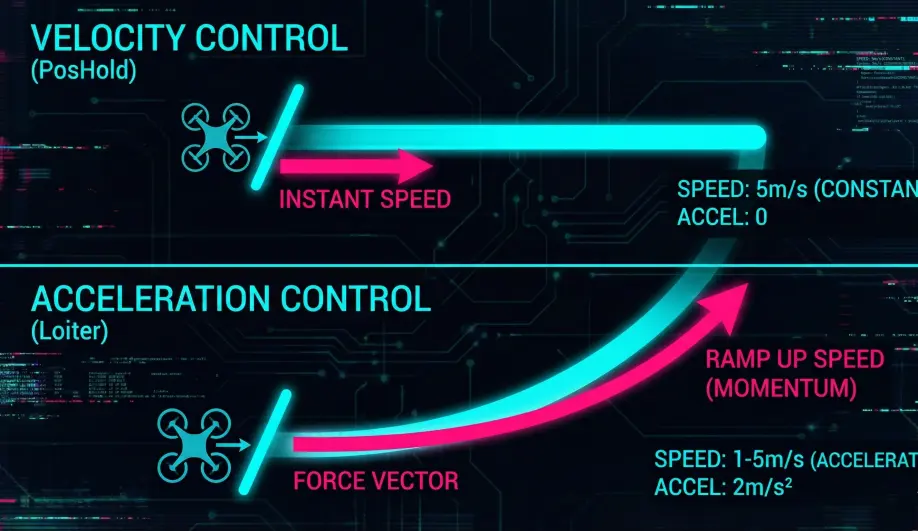
- Position Lock: "Stay at this GPS coordinate." (Stiff but can jitter).
- Velocity Lock: "Maintain 0 m/s speed." (Smooth but can drift).
- The Loiter Hybrid: ArduPilot Loiter is primarily a Velocity Controller. When you release the sticks, it calculates the braking velocity. Once stopped, it captures the current position as a "soft anchor" to prevent drift.
2. The Drift Feel
Loiter is designed for Cinematic Stabilty.
- The Math: By using an Acceleration-based input model, the drone feels heavy. It doesn't snap to a stop; it decelerates at a natural, smooth rate. This prevents the "Camera Shake" that occurs when a high-torque drone stops instantly.
Hardware Dependency Matrix
Loiter is critically dependent on a high-quality position estimate.
| Sensor | Requirement | Code Implementation Notes |
|---|---|---|
| GPS | CRITICAL | Requires a 3D Lock and low HDOP. EKF variance issues will trigger a failsafe. |
| Compass | CRITICAL | Heading is required to translate "Forward" stick into "North/East" velocity. Compass interference causes "Toilet Bowling". |
| Barometer | REQUIRED | Used for altitude hold (Z-axis). |
Control Architecture (Engineer's View)
Loiter uses the AC_Loiter library, which implements an Acceleration Controller.
- Stick to Acceleration:
- Pilot Stick Deflection is mapped to a target Acceleration (Lean Angle).
- This differs from PosHold, which maps sticks to Velocity (Speed).
- Result: The drone feels like it has "momentum." You push the stick, it leans and speeds up. You release, it leans back and slows down.
- Velocity Integrator:
- The requested acceleration is integrated into a target velocity.
- This target velocity is fed into the Position Controller (
AC_PosControl).
- Braking Logic:
- When sticks are centered, the controller enters a braking phase.
- It calculates the distance required to stop based on
LOIT_BRK_ACCELandLOIT_BRK_JERK(smoothness). - It effectively generates a virtual waypoint at the stopping point and flies to it.
Pilot Interaction
- Moving: Push sticks to accelerate. The vehicle will speed up until it reaches
LOIT_SPEED. - Stopping: Release sticks. The vehicle will "coast" to a stop. The distance it coasts depends on how fast you were going and the Braking parameters.
- Repositioning: You can "nudge" the position at any time.
Failsafe Logic
- GPS Loss: If the EKF loses confidence in the position (GPS Glitch/Loss), the mode fails.
Key Parameters
| Parameter | Default | Description |
|---|---|---|
LOIT_SPEED |
1250 | (cm/s) Max horizontal speed. |
LOIT_ACC_MAX |
500 | ($cm/s^2$) Max acceleration. Higher = punchier. |
LOIT_BRK_ACCEL |
250 | ($cm/s^2$) Deceleration rate when stopping. Higher = stops faster but jerks more. |
LOIT_BRK_JERK |
500 | ($cm/s^3$) "Jerk" limit. How fast the braking acceleration ramps up. Lower = smoother start to braking. |
Source Code Reference
- Mode Logic:
ardupilot/ArduCopter/mode_loiter.cpp - Controller Logic:
AC_Loiter::update()
Practical Guide: Making Loiter Feel Like PosHold
Many FPV pilots hate Loiter because it feels "slushy" compared to the direct response of PosHold or Stabilize. You can tune Loiter to be much crisper.
The Problem: "The Drift"
By default, when you let go of the sticks, Loiter gently decelerates over 2-3 meters. This is great for filming, but bad for precision flying.
The Fix: Aggressive Braking
- Increase
LOIT_BRK_ACCEL:- Default: $250 cm/s^2$ (2.5 m/s).
- Try: 500 - 800. This makes the drone brake twice as hard.
- Increase
LOIT_BRK_JERK:- Default: $500 cm/s^3$.
- Try: 1000 - 1500. This allows the braking force to ramp up instantly, rather than easing in.
- Increase
LOIT_ACC_MAX:- Default: 500.
- Try: 700 - 900. This makes the drone accelerate faster when you push the stick.
Result
The drone will now stop almost instantly when you release the sticks, similar to a DJI drone in "Sport" mode, while still maintaining the GPS position lock safety.