DShot & ESC Telemetry Backend
Executive Summary
DShot is a digital protocol for controlling ESCs. Unlike PWM (which varies pulse width), DShot sends a packet of data (Thrust + Telemetry Request + Checksum). This eliminates calibration issues and allows for Bi-Directional Communication: the ESC can report its RPM back to the flight controller on the same wire immediately after receiving a command.
Theory & Concepts
1. Digital Communication vs. Analog PWM
- Analog (PWM): The Flight Controller sends a pulse. The length of the pulse (1ms to 2ms) determines the speed.
- Problem: Small voltage drops in the wires can change the pulse length. The ESC and FC must be calibrated to agree on what "1.5ms" looks like.
- Digital (DShot): The Flight Controller sends a digital number (e.g.
1024).- Benefit: There is no calibration.
1024always means exactly1024. It includes a Checksum (CRC), so if electrical noise corrupts the bit, the ESC ignores the packet rather than spinning up to full throttle.
- Benefit: There is no calibration.
2. GCR Encoding
DShot uses GCR (Group Code Recording) encoding. This ensures there are never too many "zeros" or "ones" in a row.
- Why? High-speed serial links need frequent transitions (edge triggers) to keep the clocks on the FC and ESC synchronized. GCR guarantees these edges, allowing for reliable data transfer at up to 1.2 Mbit/s over simple wires.
Architecture (The Engineer's View)
1. DShot Transmission
- Protocol:
MOT_PWM_TYPEselects the speed (DShot150, 300, 600, 1200). - DMA (Direct Memory Access): The CPU does not toggle the pins manually (too slow/jittery).
- It creates a buffer of "High" and "Low" bit patterns in RAM.
- It triggers a DMA transfer to the Timer hardware.
- The Timer pushes the waveform out to the pin perfectly.
- Code Path:
RCOutput::set_dshot_rate().
2. Bi-Directional Telemetry (RPM)
- The Problem: We want RPM data for the Harmonic Notch Filter, but we don't want extra wires.
- The Solution:
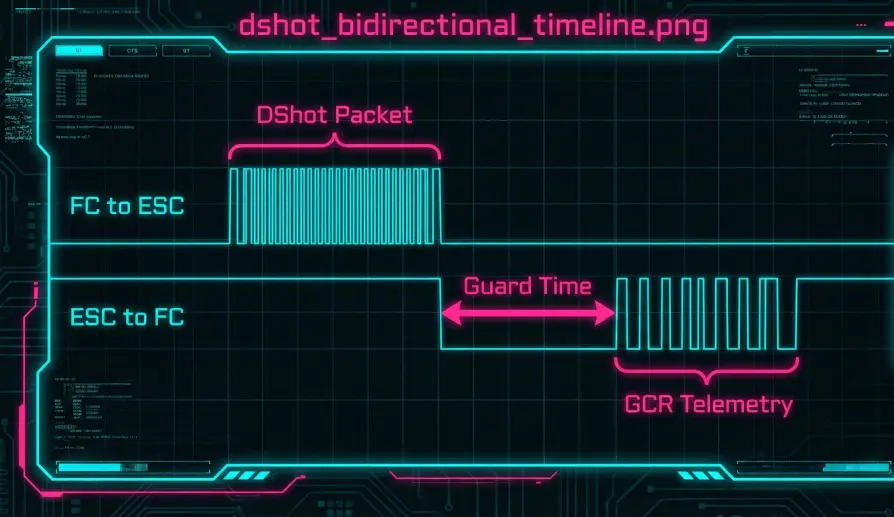
- Flight Controller sends DShot command (e.g., 20us).
- Flight Controller flips the pin to Input Mode.
- ESC waits 20us, then sends a GCR-encoded pulse stream representing RPM.
- Flight Controller captures this stream using Input Capture DMA.
- Flight Controller decodes it and feeds it to the EKF / Notch Filter.
- Code Path:
bdshot_decode_telemetry_packet().
Hardware Constraints
- Timer Groups: DShot channels are grouped by hardware timers. All channels on a single timer must run at the same DShot rate.
- DMA Conflict: Bi-Directional DShot requires a DMA channel for both TX and RX. Some flight controllers run out of DMA channels, forcing you to disable Bi-Dir on some outputs.
Key Parameters
| Parameter | Default | Description |
|---|---|---|
MOT_PWM_TYPE |
0 | 4=DShot150, 5=DShot300, 6=DShot600. |
SERVO_BLH_AUTO |
1 | Enable automatic ESC mapping for BLHeli passthrough. |
SERVO_DSHOT_ESC |
0 | Which DShot type the ESCs support (for capability checks). |
Source Code Reference
- Telemetry Decoder:
RCOutput::bdshot_decode_telemetry_packet()
Practical Guide: Enabling DShot & RPM
Forget "DShot Calibration." DShot doesn't need calibration. But it does need configuration.
Step 1: Set Protocol
- Parameter:
MOT_PWM_TYPE = 6(DShot600). - Reboot: You MUST reboot the flight controller to switch the timer hardware from PWM mode to DShot mode.
Step 2: Enable Bi-Directional Telemetry
- Parameter:
SERVO_BLH_AUTO = 1. This enables the BLHeli Passthrough/Telemetry backend. - Parameter:
SERVO_BLH_TRATE = 10. Sets the telemetry update rate (10Hz). Note: This is for the slow "Temperature/Volts" telemetry, not the fast RPM telemetry. - Parameter:
SERVO_BLH_BDMASK. Set the bitmask for your motors.- Example: For a Quad on outputs 1-4, value is 15 (binary 1111).
- Reboot.
Step 3: Verify
- Connect battery.
- Go to Mission Planner -> Status.
- Look for
esc1_rpm,esc2_rpm. - Spin the motors (props off). If you see RPM values changing, you are ready for Harmonic Notch tuning.