Frame Class vs Type Architecture
Executive Summary
When you configure a drone in Mission Planner, you select a Frame Class (e.g., Quad, Hexa) and a Frame Type (e.g., X, V, Plus). These are not just GUI labels; they map directly to C++ Enums that drive the initialization logic of the Motor Mixer. Understanding this mapping is the first step to creating a custom airframe.
Theory & Concepts
1. The Geometry of Control
A multicopter maneuvers by varying the thrust of its motors relative to its Center of Gravity (CoG).
- Frame Class: Defines the "Complexity" of the mixer. A Quad has 4 motors to balance; an Octo has 8. More motors provide redundancy but require a more complex matrix.
- Frame Type: Defines the "Orthogonality." In a "Plus" frame, one motor handles Pitch exclusively. In an "X" frame, all four motors contribute to both Pitch and Roll.
2. Symmetry and Stability
The EKF assumes the vehicle is physically symmetrical. If you mount a motor slightly further from the CoG than its partner, the drone will have a "biased" feel. ArduPilot compensates for this during initialization by normalizing the mixer factors, ensuring that a "10% Roll" command results in the same angular acceleration whether you are rolling left or right.
Architecture (The Engineer's View)
The logic resides in AP_MotorsMatrix::setup_motors().
1. Frame Class (The "How Many")
Defined in AP_Motors_Class.h.
- Purpose: Determines the number of motors and the base structure.
- Examples:
MOTOR_FRAME_QUAD(4),MOTOR_FRAME_HEXA(6),MOTOR_FRAME_OCTA(8). - Logic: The code switches on
frame_classto call the appropriate setup function (e.g.,setup_quad_matrix).
2. Frame Type (The "Where")
Defined in AP_Motors_Class.h.
- Purpose: Determines the geometry (angles) of the motors.
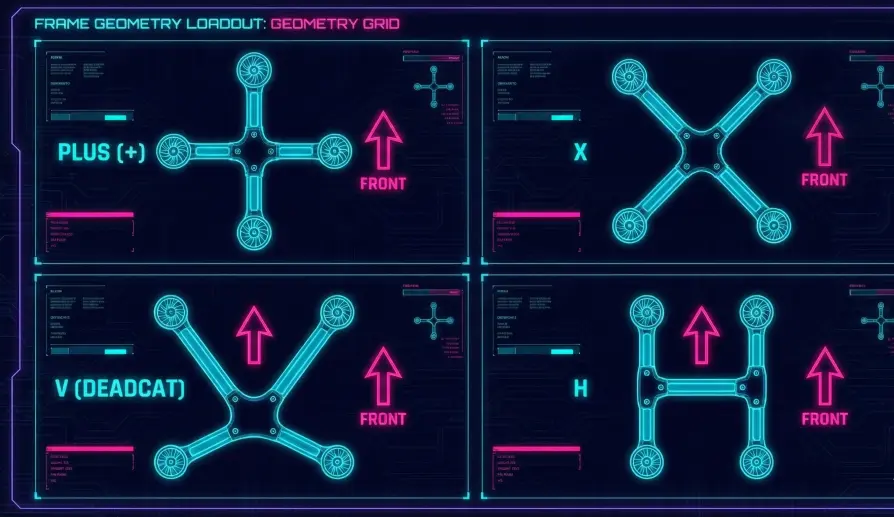
- Examples:
MOTOR_FRAME_TYPE_X: Standard X configuration.MOTOR_FRAME_TYPE_PLUS: Motors at 0, 90, 180, 270 degrees.MOTOR_FRAME_TYPE_V: Deadcat or V-tail geometry.
- Logic: Inside
setup_quad_matrix, the code switches onframe_typeto define the specific motor angles.
3. The Setup Sequence
- Clear: Existing motor definitions are wiped.
- Define: The code iterates through the motors for the selected Class/Type.
- Add: It calls
add_motor()for each one, passing the physical angle (degrees) and Yaw Factor (CW/CCW). - Normalize: It calls
normalise_rpy_factors()to ensure the total authority on each axis sums to reasonable values (preventing one axis from overpowering the others).
Why is this Hard-Coded?
You might wonder why ArduPilot doesn't just let you type in angles in the parameters.
- Safety: Hard-coding ensures that a parameter reset doesn't scramble your mixer and flip your drone.
- Efficiency: Pre-calculating the factors (Sin/Cos) saves CPU cycles during the fast loop.
- Modern Solution: For custom geometries without recompiling, ArduPilot now offers Lua Scripting Mixers (see Section 3).
Key Parameters
| Parameter | Default | Description |
|---|---|---|
FRAME_CLASS |
1 | 1=Quad, 2=Hexa, 3=Octa, etc. |
FRAME_TYPE |
1 | 0=Plus, 1=X, 2=V, 3=H, etc. |
Source Code Reference
- Setup Logic:
AP_MotorsMatrix::setup_motors() - Quad Logic:
AP_MotorsMatrix::setup_quad_matrix()
Practical Guide: Setting up a Deadcat
A "Deadcat" frame has the front arms wider apart to clear the camera. If you configure it as a standard "X", the rear motors will overwork during pitch maneuvers.
The Setup
- Class:
FRAME_CLASS = 1(Quad). - Type:
FRAME_TYPE = 2(V-Tail / Deadcat).- Note: In older versions, this was called "V". It applies to any frame where the front motors are wider than the rear motors.
- Reboot: You must reboot the flight controller for mixer changes to take effect.
Validation
- Remove Props.
- Arm the drone.
- Pitch Forward: The rear motors should spin up.
- Pitch Back: The front motors should spin up.
- Yaw Left: The Front-Right and Rear-Left motors should spin up (CCW torque).
- If Yaw is wrong: You likely have a motor spin direction issue, not a frame type issue.