On-Demand Streaming (MAVLink)
Executive Summary
Modern Ground Control Stations (like QGroundControl) and custom apps (like MAVLink HUD) don't rely on the static SRx_ parameters. Instead, they use the On-Demand Streaming protocol (MAV_CMD_SET_MESSAGE_INTERVAL). This allows the GCS to request exactly the messages it needs, at the exact rates it needs, dynamically at runtime.
Theory & Concepts
1. The Command Pattern
In computing, the Command Pattern is used to encapsulate a request as an object. MAV_CMD_SET_MESSAGE_INTERVAL is a perfect example. Instead of changing a global state (a parameter), the GCS sends a discrete instruction to the system's "mouth" (the MAVLink instance) to change its behavior. This is faster and more reliable than parameter syncing for real-time adjustments.
2. Space vs. Time Complexity
Why use "Buckets"? If ArduPilot tracked 255 separate timers for 255 possible messages, the CPU would spend significant time just checking if it's "time to send" each one. By grouping them into 10 buckets, the scheduler only checks 10 timers. This is an optimization that prioritizes CPU Efficiency (saving time) over Granular Precision (saving space).
The Mechanism (Engineer's View)
When ArduPilot receives Command #511 (MAV_CMD_SET_MESSAGE_INTERVAL), it executes the following logic in set_ap_message_interval():
- Request Handling:
- Input:
Message_ID(e.g., 30 for Attitude) andInterval(us). - Conversion: Interval is converted to milliseconds.
0or-1means "Stop Streaming".
- Input:
- Bucket Assignment:
- ArduPilot does not store a unique timer for every message ID. It uses a Bucket System to save RAM.
- It maintains 10 Stream Buckets. Each bucket has a single
interval_ms.
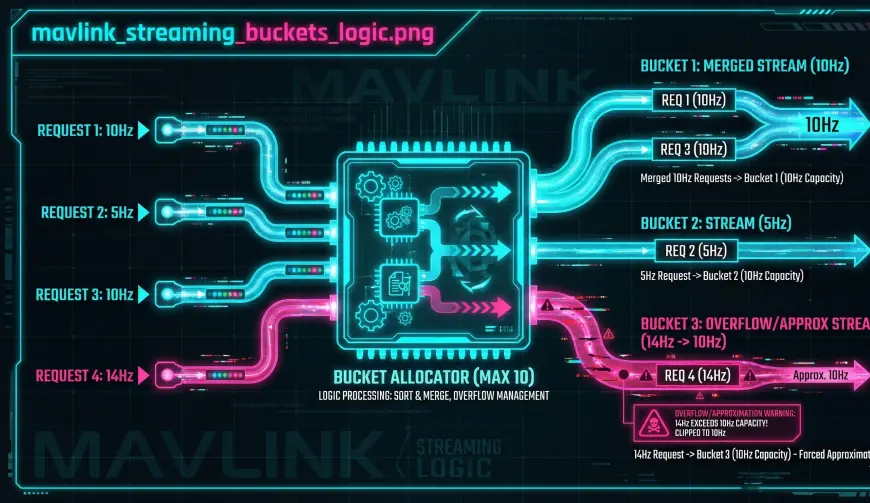
- Algorithm:
- Search: Does a bucket already exist with this exact interval? -> Assign to it.
- Create: Is there an empty bucket? -> Create new bucket with this interval and Assign.
- Fallback (The "Closest" Match): If all 10 buckets are used, the code finds the bucket with the closest interval and forces the message into it.
- Result: You might request 45Hz, but if the closest bucket is 10Hz, you get 10Hz.
Critical Limitations
- The "10 Bucket" Limit: You can only have 10 unique stream rates active simultaneously per serial port.
- Bad: Requesting 10Hz, 11Hz, 12Hz... (consumes 3 buckets).
- Good: Requesting 10Hz, 10Hz, 10Hz... (consumes 1 bucket).
- Conflict: This system overrides the
SRx_parameters. If you manually request a message, it is removed from its old bucket and moved to the new one.
Troubleshooting
"I asked for 20Hz but I'm getting 4Hz"
- Cause: You have exhausted the 10 buckets with random rate requests. ArduPilot forced your message into an existing bucket that happened to be slow (4Hz).
- Fix: Align your requests. Ask for standard rates (e.g., 10, 20, 50) rather than arbitrary calculations (e.g., 14.5Hz).
Source Code Reference
- Logic:
GCS_MAVLINK::set_ap_message_interval() - Command Handler:
handle_command_set_message_interval()
Practical Guide: Correctly Requesting High-Speed Telemetry
Don't just spam requests. Respect the bucket limit to get the performance you want.
The Golden Rule
Always align your request rates. Use a small set of standard frequencies (e.g., 1Hz, 10Hz, 50Hz) for all your message types.
Do NOT do this (The "Bucket Buster")
- Request Attitude at 30Hz
- Request GPS at 5Hz
- Request Battery at 1Hz
- Request VFR_HUD at 4Hz
- ...
- Result: You will quickly burn all 10 buckets. ArduPilot will then start merging your requests into "close enough" buckets, giving you unpredictable rates (e.g., your 30Hz Attitude might drop to 20Hz if that bucket was already full).
DO this (The "Aligned Strategy")
- Fast Group (20Hz): Attitude, VFR_HUD
- Medium Group (5Hz): GPS, Global Position
- Slow Group (1Hz): Battery, SysStatus
- Result: You only use 3 buckets. You have 7 left for other dynamic needs. Your rates will be exact and stable.
How to verify
Monitor the Res (Result) field in the COMMAND_ACK you receive.
0(ACCEPTED): Success.4(FAILED): Command rejected (rare for this cmd).- Note: ArduPilot silently modifies the rate if buckets are full, so
ACCEPTEDdoesn't guarantee the exact rate if you violated the bucket rule. You must monitor the actual stream rate to confirm.
For more details, see the ArduPilot Wiki: Requesting Data.