AutoTune Logic
Executive Summary
AutoTune is a state machine that iteratively tunes the PID controller by injecting "Twitches" (step inputs) and measuring the vehicle's response. It balances Performance (fast rise time) against Stability (minimal overshoot/bounce-back).
Theory & Concepts
1. The Twitch Test
The core mechanic is the Twitch.
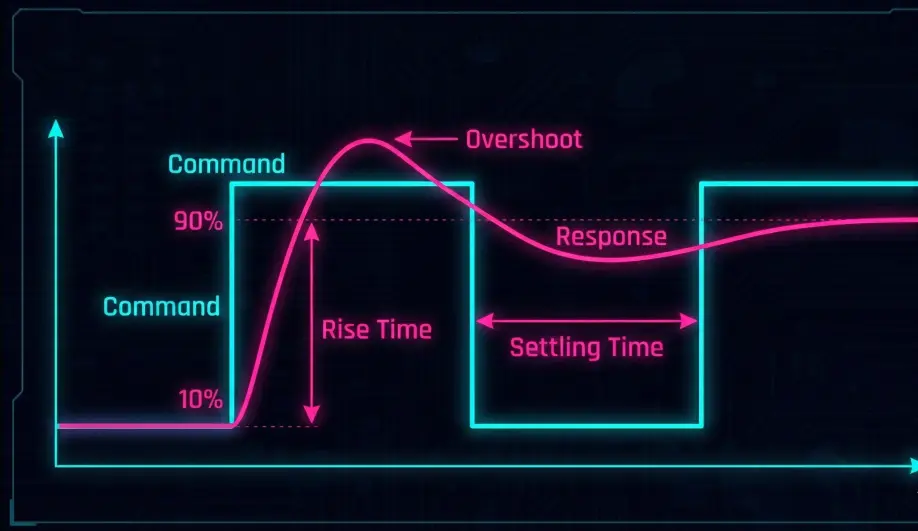
- Demand: Request a sharp 90 deg/s rotation.
- Measure: Record the maximum rate reached and the "Bounce Back" (overshoot) when the stick is released.
- Adjust:
- If rise time is too slow $\rightarrow$ Increase P.
- If bounce back is too high $\rightarrow$ Decrease D (or P if D is min).
- If no bounce back $\rightarrow$ Increase D.
2. Aggressiveness (AUTOTUNE_AGGR)
This parameter controls the damping ratio target.
- 0.1 (High): Allows 10% overshoot. Results in a "locked-in" but potentially jittery tune.
- 0.05 (Low): Over-damped. Smoother, softer video, but less propwash rejection.
Codebase Investigation
1. The State Machine: AC_AutoTune_Multi::run()
The tuning sequence is implemented in libraries/AC_AutoTune/AC_AutoTune_Multi.cpp.
The sequence is:
RD_UP: Increase Rate D until oscillation or bounce-back is detected.RD_DOWN: Decrease D until safe.RP_UP: Increase Rate P to achieve the target response speed.SP_UP: Increase Stabilize P (Angle P) to match the new rate loop speed.
2. Twitch Logic: twitching_test_rate()
Located in libraries/AC_AutoTune/AC_AutoTune_Multi.cpp.
- It measures
meas_rate_max(Peak) andmeas_rate_min(Bounce). - Bounce Calculation:
if (meas_rate_max - meas_rate_min > meas_rate_max * aggressiveness) {
    step = UPDATE_GAINS; // Too much bounce, back off
}
3. Gain Updating: updating_rate_d_up()
Located in libraries/AC_AutoTune/AC_AutoTune_Multi.cpp.
- Iteratively steps up gains (
tune_d += tune_d * tune_d_step_ratio). - If the drone becomes unstable, it reverts to the last known good gain.
Source Code Reference
- Implementation:
libraries/AC_AutoTune/AC_AutoTune_Multi.cpp
Practical Guide: AutoTune Success
1. Pre-Tune Requirements
- Filters: You must set up the Harmonic Notch Filter before AutoTune. If noise enters the gyro, AutoTune will result in very low P/D gains (under-tuned).
- CG: Center of Gravity must be perfect.
2. "AutoTune Failed"
- Cause: The drone couldn't reach the target rate (90 deg/s) even with max gains.
- Fix: Increase ATC_ACCEL_R_MAX / ATC_ACCEL_P_MAX (Physical torque authority is too low), or check for mechanical binding.
3. Post-Tune Adjustment
- Too Hot: If motors chirp after AutoTune, multiply P, I, and D by 0.8.
- Too Sloppy: If it feels loose, increase ATC_INPUT_TC (Input Time Constant) to smooth the stick response without changing the PID gains.