Fixed Wing Airframe Principles
CRITICAL Unlike a multicopter, which is a brick that beats the air into submission with raw power, a fixed-wing aircraft is a refined instrument of aerodynamics. A multicopter relies on the flight controller to stay airborne; a plane relies on physics. If your airframe is aerodynamically unstable, no amount of PID tuning will save it.
1. The Physics of Stability: The "Dart" Analogy
To understand why planes fly (or crash), you must understand Longitudinal Stability. Imagine throwing a dart backwards. It immediately flips around to fly heavy-end first. This is stability.
1.1 Center of Gravity (CG) vs. Neutral Point (NP)
- The Neutral Point (NP): Think of this as the "Aerodynamic Center" of the entire aircraft—the point where all the lift forces effectively act.
- The Center of Gravity (CG): The point where the aircraft balances.
- The Golden Rule: The CG must ALWAYS be in front of the NP.
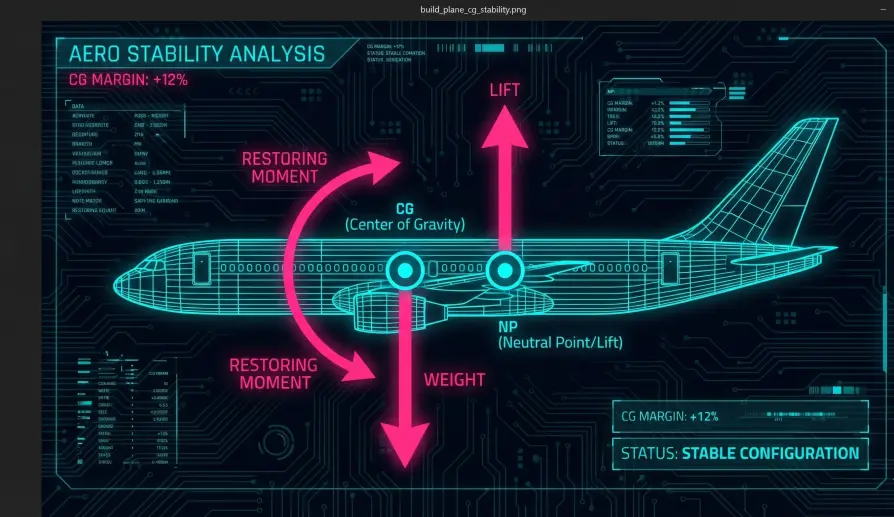
- Why? When the CG is forward, the weight pulls the nose down. The horizontal stabilizer (tail) is rigged to create a downward force (Decalage) to balance this.
- The Stability Mechanism: If a gust of wind pitches the nose up, the wing generates more lift. Because the CG is forward of the lift, this extra lift creates a lever arm that pushes the nose back down. The plane self-corrects.
- The Tail-Heavy Crash: If the CG moves behind the NP, the stability mechanism reverses. A gust pitches the nose up -> Wing generates more lift -> Lift is in front of the pivot -> Nose pitches up more. This is a "Divergent" system. The plane will flip uncontrollable within seconds of takeoff.
1.2 Static Margin
The distance between the CG and the NP is called the Static Margin.
- 5% to 15% MAC: This is the sweet spot.
- 5% (Agile): The plane is twitchy and responsive. Great for fighters, harder for autopilots.
- 15% (Stable): The plane wants to fly straight. It resists turning. Perfect for mapping drones.
- ArduPilot Implication: A highly stable plane (High Static Margin) requires more servo authority to turn. You may need to increase your
MIXING_GAINor mechanical throw to force the nose around.
2. Airfoil Selection: Choosing Your Wing
The cross-section of your wing (the airfoil) dictates the personality of your drone.
2.1 Flat Bottom (Clark-Y)
- Profile: Flat on the bottom, curved on top.
- Personality: The "School Bus."
- Pros: Generates massive lift at low speeds. Very gentle stall characteristics (the nose just drops mushily). Easy to build and launch.
- Cons: High drag at high speeds. If you dive, it creates a massive pitching-up moment that the servos must fight.
- Best For: Mapping, Surveying, Long-Endurance Loitering.
2.2 Symmetrical (NACA 00xx)
- Profile: Teardrop shape. Identical top and bottom.
- Personality: The "Acrobat."
- Pros: Zero pitching moment. It goes exactly where you point it. It flies upside down just as well as right side up.
- Cons: Zero lift at zero Angle of Attack (AoA). You must constantly hold "up elevator" (or trim) to keep it level.
- Best For: VTOL transitions, high-speed couriers.
2.3 Reflex (Flying Wings)
- Profile: The trailing edge curves up slightly.
- Physics: A flying wing has no tail to push the tail down. To prevent it from tumbling forward, the airfoil itself must have a built-in "up elevator" curve at the back. This is called Reflex.
- The Trap: You cannot use standard airfoils on a flying wing. It will become unstable and tuck (dive) as speed increases.
3. Mechanical Linkage: The "Resolution" War
This is the single most common reason ArduPilot users fail to get a good tune.
3.1 The Geometry Problem
Imagine you are driving a car, but the steering wheel is loose. You turn it 10 degrees before the tires move. This is Slop. Now imagine the steering is super sensitive: moving the wheel 1mm turns the tires 45 degrees. This is Low Resolution.
ArduPilot suffers from both.
- The Mistake: Users connect the pushrod to the outermost hole on the servo arm and the innermost hole on the control surface horn.
- Result: A tiny servo movement creates a HUGE surface movement.
- The Math: If your servo has 1000 steps of resolution, and that throw moves the aileron 90 degrees, you get ~0.1 degrees per step. But you only need 15 degrees of travel to fly! You are throwing away 80% of your servo's precision.
- The Symptom: The plane "hunts" or wobbles in level flight because the servo cannot move "just a little bit." It has to move "too much" or "not at all."
3.2 The Engineering Fix
- Servo Arm: Use the Innermost hole possible.
- Control Horn: Use the Outermost hole possible.
- Result: The servo has to move 60 degrees to move the surface 20 degrees. You have tripled your torque and tripled your resolution. ArduPilot can now make microscopic corrections for butter-smooth flight.
4. ArduPilot Integration: The Software Layer
Once the physics are sound, you must configure the software to respect them.
4.1 Stall Speed vs. Trim Speed (TRIM_ARSPD_CM)
- The Danger: Users often set their cruise speed (
TRIM_ARSPD_CM) too close to the stall speed to "save battery." - The Turn Trap: When a plane banks 60 degrees, it must generate 2Gs of lift to stay level (1 / cos(60)). This increases the stall speed by 41% (sqrt(2)).
- Scenario: You cruise at 12m/s. Your stall speed is 10m/s. You enter a sharp turn. Your stall speed jumps to 14.1m/s. You are now stalled. The inner wing drops, and the plane enters a spin.
- Rule: Set
TRIM_ARSPD_CMto at least 1.3x your measured stall speed.
4.2 The "Hard Deck" (ARSPD_FBW_MIN)
This parameter is the safety floor.
- Function: If airspeed drops below this value, ArduPilot will pitch the nose down, regardless of your altitude (even if you are 2 meters off the ground).
- Why? It is better to crash under control than to stall and spin. A controlled descent gives you a chance to recover energy; a stall is chaos.
- Tuning: Set this to roughly equal your level-flight stall speed. This gives the autopilot permission to dive to regain energy if the motor fails or the wind shears.
4.3 PTCH2SRV_RLL (The Coordinate Turn)
- Physics: When a plane rolls, it loses vertical lift. It needs "Up Elevator" to keep the nose up in the turn.
- The Parameter:
PTCH2SRV_RLLtells the integrator how much elevator to add based on the bank angle. - Tuning: If the nose drops every time you turn, increase this. If the nose pitches up and the plane climbs in turns, decrease it.