Throw Mode (Copter)
Executive Summary
Throw Mode is a specialized launch mode that allows a multicopter to be thrown into the air (or dropped from another vehicle) to start a flight. The vehicle detects the free-fall or high-velocity launch, automatically spools up the motors, stabilized itself, and then holds position. It is ideal for small racers or rugged drones where ground takeoffs are impossible (e.g., from a boat or tall grass).
Theory & Concepts
1. Free-Fall Physics
How does a drone know it was "thrown"?
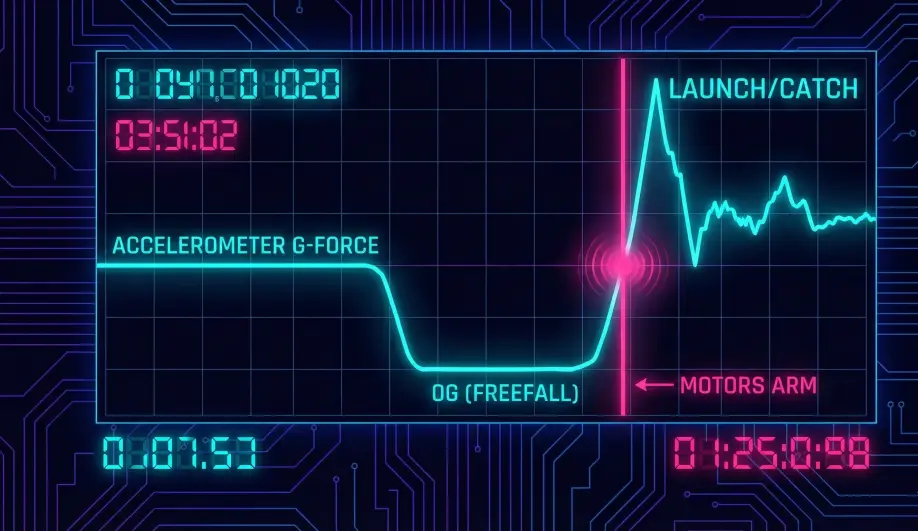
- The Weightless Point: When you throw a drone up, there is a split second at the top of the arc where it is weightless.
- The Signal: The Accelerometer measures exactly 0G on all axes.
- The Logic: ArduPilot's "Throw" detector looks for this 0G signature followed by a sudden "Catch" (as the drone stabilizes).
2. Centripetal Compensation
Throwing a drone often involves a spinning motion.
- The Problem: Centripetal force looks like gravity to an accelerometer.
- The Solution: ArduPilot uses the Gyroscope to calculate how much "Fake Gravity" is being generated by the spin and subtracts it from the accelerometer reading. This ensures the drone detects the release even if you throw it like a frisbee.
Hardware Dependency Matrix
Throw Mode requires precise sensing to differentiate between "being held" and "being thrown".
| Sensor | Requirement | Code Implementation Notes |
|---|---|---|
| Accelerometer | CRITICAL | Used to detect free-fall (gravity -> 0) and launch acceleration. |
| GPS | CRITICAL | Required for the final Throw_PosHold stage. Without GPS, the vehicle cannot stop its horizontal momentum after stabilization. |
| Barometer | REQUIRED | Used for altitude hold and vertical velocity checks. |
Control Architecture (Engineer's View)
Throw Mode is a strict 5-Stage State Machine defined in ModeThrow::run().
- Stage 1: Detecting (
Throw_Detecting)- Motor State: Motors are stopped or idling (
THROW_MOT_START). - Logic: The code monitors vertical velocity and acceleration.
- Trigger: It looks for a "Throw Event":
- Vertical Velocity > 0.5 m/s.
- High Total Speed (> 5 m/s) OR Freefall (Accel Z > -0.25g).
- Code Path:
throw_detected().
- Motor State: Motors are stopped or idling (
- Stage 2: Spool Up (
Throw_Wait_Throttle_Unlimited)- Once detected, motors are commanded to spool up. The controller waits until the motors report they are ready for full throttle authority.
- Stage 3: Uprighting (
Throw_Uprighting)- The Attitude Controller fights to bring the vehicle level.
- Constraint: It accepts any heading but demands 0 pitch/roll.
- Stage 4: Height Stabilize (
Throw_HgtStabilise)- The vehicle arrests its vertical momentum and climbs/descends to the target altitude (usually 3m above launch).
- Stage 5: Position Hold (
Throw_PosHold)- The vehicle brakes horizontally and enters a Loiter.
- Once stable, it switches to
THROW_NEXTMODE(default: Loiter).
Safety & Interlocks
- Arming: You must arm the vehicle before throwing it.
- Safety Switch: Be careful with the physical safety switch on GPS units; you cannot press it once the drone is in the air.
- Propeller Danger: The motors can spin while you are holding it if
THROW_MOT_STARTis set to 1. Set to 0 (Stopped) for safer hand-launching.
Key Parameters
| Parameter | Default | Description |
|---|---|---|
THROW_TYPE |
0 | 0=Upward Throw, 1=Drop (e.g. from a plane). |
THROW_MOT_START |
0 | 0=Motors Stop, 1=Motors Idle. '0' is safer for hand throws. |
THROW_NEXTMODE |
5 | The mode to switch to after stabilizing (5 = Loiter, 6 = RTL, etc.). |
THROW_ALT_MIN |
0 | Min altitude change required to confirm throw. |
Source Code Reference
- Mode Logic:
ardupilot/ArduCopter/mode_throw.cpp - Detection Logic:
ModeThrow::throw_detected()
Practical Guide: The "Boat Launch" Technique
Launching a drone from a small, rocking boat is impossible in Stabilize mode (the gyro initializes wrong) or Loiter (it thinks it's moving). Throw Mode is the answer.
Step 1: Configuration
- Set
THROW_MOT_START = 0. This ensures the props do not spin when you arm. This is critical for hand safety. - Set
THROW_TYPE = 0(Upward).
Step 2: The Process
- Hold the drone firmly by the body.
- Switch to Throw Mode.
- Arm the drone. The motors will beep, but props will stay stationary. You are now "Live".
- The Throw: Throw the drone Up and Away from the boat. Don't be gentle. It needs to detect >5 m/s acceleration or freefall.
- The Catch: About 0.5s after release, the motors will roar to life. The drone will level itself and climb to 3m above the throw height.
- Takeover: Once it is hovering stable, switch to Loiter and fly your mission.