Lua Scripting: The Onboard Companion
Executive Summary
Historically, if you wanted custom logic (e.g., "If battery < 10% AND altitude > 50m, turn on LEDs"), you needed a Companion Computer (Raspberry Pi) communicating via MAVLink. Now, you can run this logic inside the Flight Controller using Lua Scripting. This eliminates the weight, power, and complexity of an external computer for simple tasks.
Architecture (The Engineer's View)
1. The Virtual Machine (Lua 5.3)
ArduPilot embeds a lightweight Lua 5.3 VM.
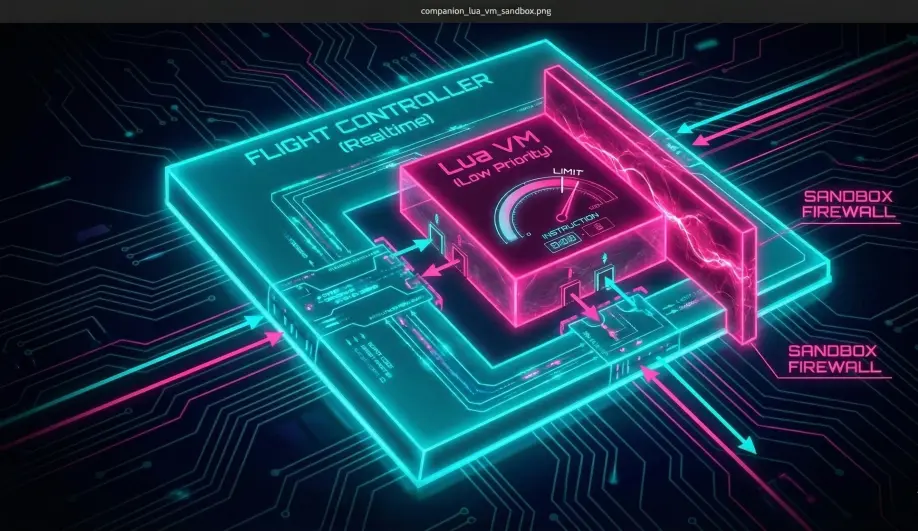
- Isolation: The VM runs in a separate thread with a low priority.
- Safety: The script is allocated a strict Instruction Count Quota (default 10,000 ops). If it runs too long, the scheduler pauses it. This ensures a buggy infinite loop in your script cannot crash the flight controller.
- Memory: The script gets a fixed heap (
SCR_HEAP_SIZE, e.g., 40KB). If you leak memory, the script crashes, but the drone keeps flying.
2. The Bindings (API)
The C++ code exposes specific functions to Lua via an automated binding generator.
- Singletons: Global objects like
vehicle,ahrs,gcs.a = ahrs:get_roll()gcs:send_text(6, "Hello World")
- Methods:
param:set('RTL_ALT', 5000)
3. Use Cases vs. Companion Computer
- Use Lua When:
- You need < 10ms latency (e.g., custom motor mixing).
- You are interacting with hardware pins (LEDs, Relays).
- The logic is simple state-machine stuff ("Smart Failsafe").
- Use Companion Computer When:
- You need Computer Vision (OpenCV).
- You need Internet Access (4G/LTE).
- You need massive storage (Data logging).
Key Parameters
| Parameter | Default | Description |
|---|---|---|
SCR_ENABLE |
0 | Enable the VM. Requires reboot. |
SCR_HEAP_SIZE |
40000 | (Bytes) RAM allocated to the script. Increase for complex scripts. |
SCR_VM_I_COUNT |
10000 | Max instructions per loop. |
Source Code Reference
- Thread Runner:
AP_Scripting::thread() - Bindings:
libraries/AP_Scripting/generator/description/bindings.desc
How to Enable Lua Scripting
-
Enable the Module:
- Connect to your flight controller via Mission Planner or QGroundControl.
- Set the parameter
SCR_ENABLEto 1. - Reboot the flight controller. This is required to allocate the Lua VM memory.
-
Configure Memory:
- Check
SCR_HEAP_SIZE. The default (often 40KB) is enough for simple logic but too small for complex scripts. - Recommended: Increase to 100000 (100KB) or more if your board supports it (H7 boards have plenty of RAM).
- Check
-
Install the Script:
- Remove the SD card from the flight controller or use MAVFTP.
- Navigate to the
APM/scripts/directory on the SD card. (Create it if it doesn't exist). - Copy your
.luafile into this folder.
-
Verify Execution:
- Reboot the flight controller.
- Check the Messages tab in your GCS. You should see a message like "Lua: MyScript.lua start".
- If you see "Lua: OOM", increase
SCR_HEAP_SIZE.
Practical Guide: Running Your First Script
Use this template to create a script that listens to an RC switch and prints a message.
Step 1: The Code (hello.lua)
-- Define the polling rate (ms)
local UPDATE_INTERVAL_MS = 1000

-- Main Loop Function
function update()
  -- Read the state of RC Channel configured as "Scripting 1" (Option 300)
  -- rc:find_channel_for_option(300) finds the channel mapped to SCRIPTING_1
  local switch_ch = rc:find_channel_for_option(300)

  if switch_ch then
      local pwm = switch_ch:get_aux_switch_pos()
      -- 0=Low, 1=Mid, 2=High
      if pwm == 2 then
          gcs:send_text(6, "Lua: Switch is HIGH!")
      end
  else
      gcs:send_text(4, "Lua: RC Switch not configured!")
  end

  -- Schedule next run
  return update, UPDATE_INTERVAL_MS
end

-- Start the loop
gcs:send_text(6, "Lua: Hello World Script Started")
return update()
Step 2: Setup
- Save the code as
hello.luainAPM/scripts/. - Set
RC7_OPTION = 300(Scripting 1). This maps your transmitter's Channel 7 switch to the script. - Reboot.
- Toggle your Channel 7 switch to High. You should see "Lua: Switch is HIGH!" in the GCS messages every second.
The Lifecycle
- Boot: ArduPilot initializes drivers.
- Script Load: The Lua VM starts and parses your file from top to bottom.
- Tip: Do your expensive setup (allocating arrays) here, outside the
updatefunction.
- Tip: Do your expensive setup (allocating arrays) here, outside the
- Run: The line
return update()tells ArduPilot to schedule theupdatefunction. - Loop: Every 1000ms (as requested), ArduPilot wakes up the script, runs
update(), and puts it back to sleep.