Debugging Mixers: Motor Test & Logging
Executive Summary
After defining a custom frame, the most terrifying moment is the first arming. Will it flip? To verify your mixer without flying, you use the Motor Test tool in Mission Planner (or QGC). This tool sends a command to spin specific motors in a specific order, allowing you to verify that "Motor A" in the software corresponds to "Front Right" on your frame.
Theory & Concepts
1. Pre-Flight Confidence & Safety
In aerospace, every system must be verified before "First Motion." The Motor Test is a System Identification step.
- Verification: You are proving that the Software Mapping, the ESC Protocol (DShot), and the Physical Wiring are all in alignment.
- Torque Check: By spinning just one motor, you verify its rotation direction. If Motor 1 is CCW but spins CW, the drone will flip instantly on arming. Motor Test is the only safe way to catch this before takeoff.
2. The Command/Control Loop Bypass
The Motor Test is an Open-Loop command.
- It bypasses the EKF, the PIDs, and the IMU.
- Why? If the drone is on your workbench and you move it, the PIDs would normally try to spin the motors to "level" it. Motor Test disables this, sending a fixed PWM value directly to the motor. This is why it only works while the vehicle is Disarmed.
Architecture (The Engineer's View)
The logic operates via the MAVLink command MAV_CMD_DO_MOTOR_TEST.
1. The Test Sequence
The test does not simply say "Spin Motor 1". It says "Spin the 1st motor in the sequence".
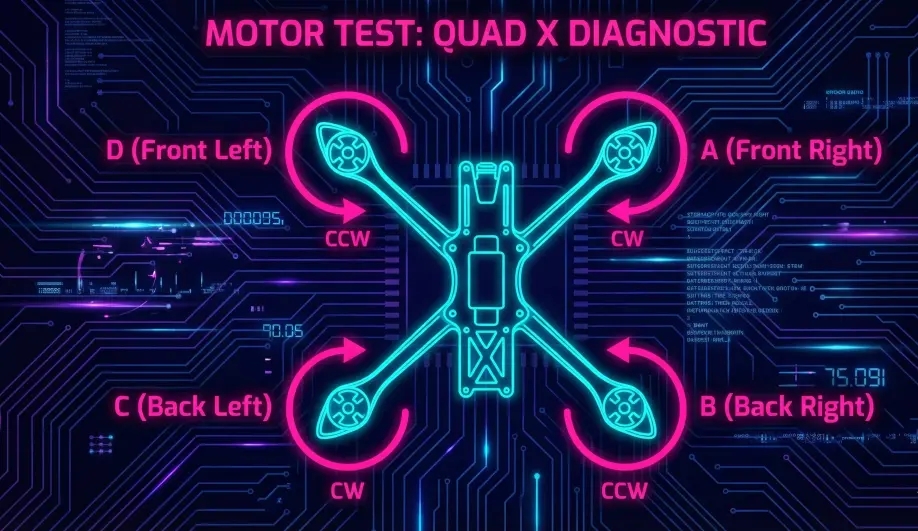
- The Sequence: Defined in the
setup_motorsfunction by thetesting_orderparameter. - Standard: Clockwise starting from Front Right (A, B, C, D...).
- Custom: You define this order when calling
add_motor. - Code Path:
handle_MAV_CMD_DO_MOTOR_TEST().
2. Execution Logic
- Safety Check: The vehicle must be Disarmed (usually). The Safety Switch must be active.
- Timeout: The spin runs for a set duration (e.g., 2 seconds) and then auto-stops.
- Passthrough: The code bypasses the entire Attitude Controller. It injects a PWM value directly into the
SRV_Channelsoutput buffer.
3. Verifying with Logs (RCOUT)
If the physical motor doesn't spin, checking the logs tells you if it's a Software or Hardware issue.
- Log:
RCOUT. - Channels:
C1,C2,C3, etc. - Test: Run the Motor Test.
- Analysis:
- RCOUT shows 1100pwm: The software is working. The issue is your wiring, ESC, or BEC.
- RCOUT shows 1000pwm (Min): The software isn't trying to spin it. Check your
SERVOx_FUNCTIONmapping.
Common Issues & Troubleshooting
- "Command Rejected": You are likely Armed. You must Disarm to run the test.
- "Motor spins wrong direction": This is an ESC setting (swap wires or use DShot Reverse), NOT a mixer setting.
- "Wrong motor spins": Your
SERVOx_FUNCTIONmapping is wrong, or yourtesting_orderin the C++ definition is confusing.
Source Code Reference
- Command Handler:
GCS_MAVLINK_Copter::handle_MAV_CMD_DO_MOTOR_TEST()