Compass Fusion & Magnetic Interference
Executive Summary
Magnetometers (Compasses) are the most fragile sensors on a drone. They are easily corrupted by power lines, metal bridges, or even the drone's own motors. The EKF3 Compass Fusion system is designed to tolerate significant magnetic interference by estimating the Magnetic Field Vector (Earth + Body) rather than just trusting the raw compass heading.
Theory & Concepts
1. The Earth as a Bar Magnet (WMM)
The Earth's magnetic field is not uniform.
- WMM (World Magnetic Model): ArduPilot includes a compressed version of the NOAA/NGA magnetic model.
- The Check: The EKF uses this model to know exactly what the magnetic field should look like at your current GPS location (Inclination, Declination, and Field Strength). If the compass reports something wildly different, ArduPilot knows you are near a metal object or that the sensor is broken.
2. Dip Angle (Magnetic Inclination)
Near the Equator, the magnetic field is horizontal. Near the Poles, it points straight into the ground.
- The Issue: If your drone is not level, a vertical magnetic field can look like a horizontal one, causing a heading error.
- The Fusion: The EKF uses the IMU (Accelerometers) to know "Down" and then projects the magnetic vector into the horizontal plane to find "North."
Core Concepts (The Engineer's View)
1. 3-Axis Field Estimation
Simple autopilots just use atan2(MagY, MagX) to get heading. ArduPilot's EKF is smarter.
It estimates 6 states related to magnetism:
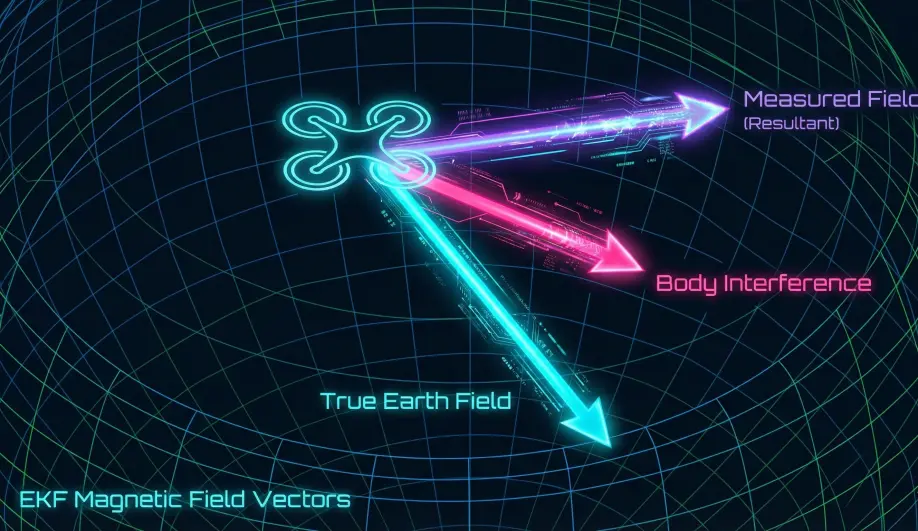
- Earth Field (3): The true North/Down vector of the Earth at your location.
- Body Field (3): The interference attached to the drone (e.g., a magnetized screw next to the sensor).
- Result: The EKF learns to subtract the Body Field from the measurement to find the true Earth Field.
2. Mag Anomaly Detection
The EKF compares the Measured Field Length against the Expected Earth Field (from the World Magnetic Model lookup table).
- Takeoff Check: If the field strength changes significantly as you throttle up (motor interference) or as you lift off (ground interference like rebar), the EKF flags a Mag Anomaly.
- Response: It stops fusing compass data temporarily and relies on Gyros (dead reckoning) until the field stabilizes.
3. EKF-GSF (Compass-Less Yaw)
What if the compass fails completely mid-flight?
- Mechanism: The Emergency Yaw Reset.
- Algorithm: The EKF runs a bank of parallel estimators (Gaussian Sum Filter) that try to guess the Yaw based on Velocity. If you fly forward, the GPS velocity vector must be the direction of travel (for a multicopter/plane in coordinated flight).
- Result: If the compass innovation grows too large (bad compass), the EKF resets its Yaw to match the GPS track. This saves the drone from the dreaded "Toilet Bowl" crash.
Troubleshooting Mag Issues
- "Compass Variance": The EKF has rejected the compass data.
- Cause: Metal in the ground, or bad calibration.
- "Mag Anomaly": Sudden change in field strength.
- Cause: Flying near a power pylon or bridge.
- Toilet Bowling: The drone circles while trying to hover.
- Cause: The EKF is accepting bad compass data. The "Heading" is wrong, so when the drone tries to stop "North" drift, it actually accelerates "East", creating a spiral.
4. Indoor Flight & The Toilet Bowl Effect
Indoor environments are "Mag-Toxic" due to rebar in concrete and electrical infrastructure. Without a clear view of the sky, standard GPS cannot correct compass-induced drift.
- Deep Dive: For a technical analysis of why this happens specifically in stadium and warehouse environments, see the Toilet Bowl Effect Guide on the MAVLink GPS site.
Key Parameters
| Parameter | Default | Description |
|---|---|---|
EK3_MAG_CAL |
3 | (0-6) Determines when the EKF is allowed to learn magnetometer offsets in-flight. |
EK3_MAG_I_GATE |
300 | (3 sigma) Strictness of the innovation check. |
COMPASS_LEARN |
0 | Legacy method. Prefer EKF learning (EK3_MAG_CAL). |
Source Code Reference
- Fusion Logic:
NavEKF3_core::FuseMagnetometer() - Yaw Fusion:
NavEKF3_core::fuseEulerYaw()
Practical Guide: Solving Toilet Bowling (Compass Motor Compensation)
If your drone holds position well at idle but starts spiraling ("Toilet Bowling") as you fly faster or punch the throttle, your power distribution is generating a magnetic field that blinds the compass.
The Fix: MagFit (Motor Compensation)
You need to tell ArduPilot how much interference your motors generate so it can subtract it.
- Fly a "MagFit" Figure-8:
- Find a calm day.
- Take off and fly aggressive fast circles or figure-8s. You need to use high throttle and high current.
- Fly for about 1 minute.
- Land and Disarm.
- Analyze the Log:
- Apply the Parameters:
- If MagFit finds a correlation, it will suggest new values for
COMPASS_MOT_x(x/y/z offsets). - Accept the changes.
- Set
COMPASS_MOTCT = 2(Use Current) if you have a current sensor, or1(Use Throttle) if you don't.
- If MagFit finds a correlation, it will suggest new values for
Why not just move the compass?
Moving the compass/GPS 5cm higher on a mast is often more effective than any software calibration. Magnetic fields decay with the cube of the distance ($1/r^3$). A small move makes a huge difference.