Vibration Failsafe & Clipping
Executive Summary
Vibration is the #1 enemy of the EKF. If the frame vibrates too much, the accelerometers produce "Aliased" data—high-frequency shaking that the EKF interprets as a constant acceleration. This causes the drone to "Rocket" into the sky or drift uncontrollably. The Vibration Failsafe monitors sensor health and triggers emergency measures (usually switching to AltHold or Land) if the vibration becomes dangerous.
Theory & Concepts
1. Signal Aliasing & The Nyquist Limit
In digital signal processing, you must sample a signal at twice its frequency to "see" it.
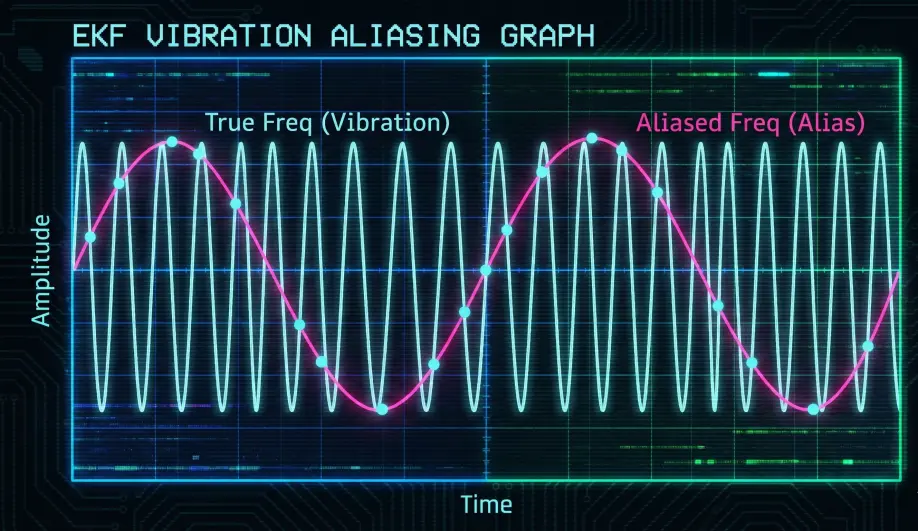
- The Vibration: A motor might vibrate at 200 Hz.
- The Problem: If the flight controller only samples the Accelerometer at 100 Hz, it cannot see the 200 Hz wave. Instead, that wave "aliases" into a lower frequency (like 5 Hz), making the drone think it is bobbing up and down.
- The Solution: ArduPilot samples at very high rates (up to 8 kHz) and uses Hardware Low-Pass Filters to kill the high-frequency vibration before it can alias into the EKF.
2. Clipping & Non-Linear Errors
Accelerometers are not infinite. They have a physical limit (clipping point).
- The Error: If a sensor clips at 16G, and a vibration spike hits 20G, the sensor only reports 16G.
- The Math: This "lost 4G" of data is a non-linear error. It can't be filtered out. The EKF sees a massive "Net Acceleration" in one direction that isn't real. This is why mechanical damping (foam/rubber) is superior to digital filtering for high-vibration frames.
Architecture (The Engineer's View)
1. Clipping (Sensor Saturation)
- Mechanism: Accelerometers have a physical range (e.g., +/- 16G). If a vibration spike exceeds this, the sensor reports "16G".
- The Error:
- Real motion: +20G up, -20G down (Net: 0).
- Measured: +16G up, -16G down (Net: 0).
- Result: If the vibration is asymmetric, or if the clipping happens frequently, the integration (
Velocity = Sum(Accel * dt)) accumulates a massive error.
- Metric:
[VIBE](/field-manual/log-analysis/vibration-analysis.html).Clip0/1/2counts the number of times the sensor hit the limit. Any clipping is bad.
2. The Vibration Check (check_vibration)
ArduCopter runs a dedicated check in ekf_check.cpp.
- Trigger: It monitors the EKF's Vertical Velocity Innovation.
- Logic:
- If the EKF thinks we are climbing fast (
Innov > 0) AND the Variance is high (vel_variance > 1.0), it assumes vibration aliasing. - Why? Because vibration usually aliases into the Z-axis (up/down) most severely.
- If the EKF thinks we are climbing fast (
- Action:
Why "Rocketing"?
If vibration aliases as "Downward Acceleration" (the drone thinks it is falling), the Z-controller responds by applying Max Throttle to "stop the fall".
- Result: The drone shoots into the sky.
- Fix: Improving isolation dampers or balancing props is the only fix. PID tuning cannot fix mechanical vibration.
Key Parameters
| Parameter | Default | Description |
|---|---|---|
INS_ACCEL_FILTER |
20 | (Hz) Low-pass filter for accel. Lowering this can mask vibration but adds latency. |
EK3_HGT_I_GATE |
500 | Height Innovation Gate. High vibration pushes the innovation past this gate, triggering the failsafe. |
Source Code Reference
- Failsafe Logic:
Copter::check_vibration() - Clipping Count:
AP_InertialSensor::get_accel_clip_count()
Practical Guide: Diagnosing Vibration
If your drone switched to AltHold automatically or flew away, you likely have a vibe problem.
Step 1: Check for Clipping
- Open the log in Mission Planner.
- Search for VIBE message.
- Look at
Clip0,Clip1,Clip2. - The Rule: These should be Zero during flight.
- Crash: Clipping during a crash is normal.
- Flight: If
Clipincreases while hovering, your autopilot is loose or your props are horribly unbalanced. Do not fly.
Step 2: Check Vibe Levels
- Plot
VIBE.VibeX,VibeY,VibeZ. - Safe Zone: Below $15 m/s^2$.
- Danger Zone: Above $30 m/s^2$.
- Critical: Above $60 m/s^2$. The EKF will fail here.
The Hardware Fix
- Soft Mounting: Put the flight controller on gel pads (Kyosho Zeal) or rubber bobbins.
- Cable Discipline: Ensure wires plugging into the FC are loose. A tight wire transmits frame vibration directly into the sensor, bypassing the soft mount.
- Prop Balance: Balance your props. Tape is cheaper than a new drone.