IMU Architecture & Fusion
Executive Summary
The Inertial Measurement Unit (IMU) is the heart of the flight controller. It consists of Gyroscopes (rotation rate) and Accelerometers (force/gravity). Modern controllers like the Cube Orange have Three IMUs for redundancy. ArduPilot runs multiple EKF instances in parallel (Lanes) and dynamically switches to the healthiest IMU to prevent crashes during sensor failure.
Theory & Concepts
1. The Gravity Vector (Finding Down)
How does the drone know which way is up?
- Stationary: The Accelerometer measures 1G pointing Down.
- Moving: The Accelerometer measures Gravity + Acceleration (Centrifugal force in a turn).
- The Fusion: The EKF uses the Gyro to track short-term rotation and the Accelerometer to correct long-term drift (Gravity Reference).
2. The Voting Logic (Tri-Redundancy)
Why three IMUs?
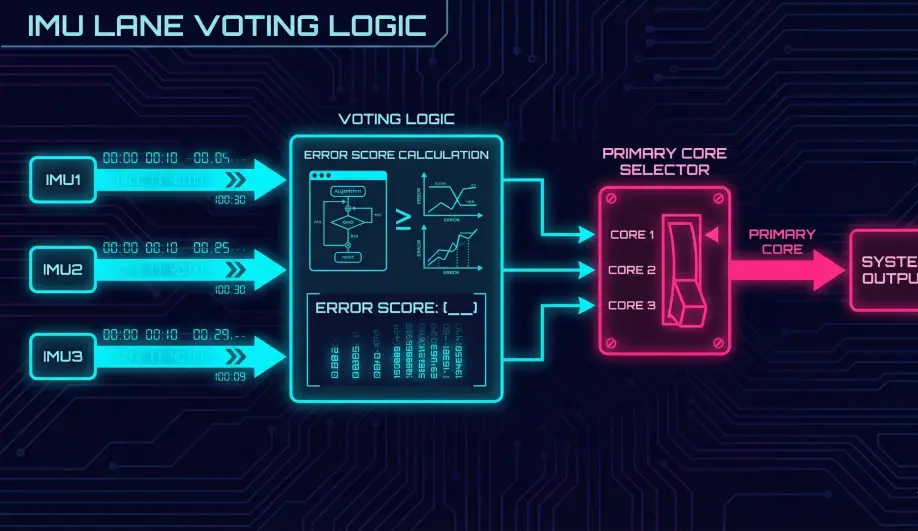
- Two IMUs: If IMU1 says "Up" and IMU2 says "Down", who is right? You don't know.
- Three IMUs: If IMU1 and IMU3 agree, but IMU2 disagrees, IMU2 is voted out.
- Mechanism: ArduPilot's EKF Selector monitors the "Innovation" (Error) of each lane. The lane with the lowest error relative to GPS/Baro is chosen as the Primary.
3. DCM vs EKF
- DCM (Direction Cosine Matrix): The old "Stabilize" algorithm. Simple, robust, but gets confused by long accelerations (e.g., spiraling plane).
- EKF (Extended Kalman Filter): The modern brain. It tracks "Bias" states, allowing it to realize that "My Gyro says we are spinning, but the Compass says we aren't -> Therefore the Gyro is drifting."
Architecture (The Engineer's View)
1. Hardware Abstraction (AP_InertialSensor)
This library manages the physical drivers (SPI/I2C).
- Sampling: Reads raw data at high speed (1kHz - 8kHz).
- Filtering: Applies Low-Pass Filters (LPF) and Harmonic Notch Filters to remove vibration noise.
- Calibration: Applies factory temp calibration and user offsets (
INS_ACCOFFS,INS_GYROOFFS).
2. The Lane System (Redundancy)
ArduPilot does not just "average" the three IMUs. It treats them as separate Lanes.
- EKF Lane 1: Uses IMU 1.
- EKF Lane 2: Uses IMU 2.
- EKF Lane 3: Uses IMU 3.
- Benefit: If IMU 1 goes crazy (mechanical failure or stuck bit), Lane 1 will diverge (high Innovation). Lane 2 and 3 will remain healthy. The EKF Selector will switch to Lane 2 instantly.
3. Primary Selection
The AHRS (Attitude Heading Reference System) asks the EKF: "Which lane is best?"
- Code Path:
AP_AHRS::_get_primary_IMU_index()checks the EKF'sget_primary_core_index(). - Result: The flight control loops (Stabilize, Rate) always use the data from the "Winning" IMU.
4. Sensor Fusion (Getting Attitude)
How do we know which way is Up?
- Gyro: Fast, precise, but drifts over time.
- Accel: Noisy, but the average vector points Down (Gravity).
- Fusion: The EKF combines them.
- High Frequency: Trust the Gyro.
- Low Frequency: Correct the Gyro drift using the Accel (Gravity vector).
Key Parameters
| Parameter | Default | Description |
|---|---|---|
EK3_IMU_MASK |
3 | Bitmask of which IMUs to use. 3 = IMU 1 and 2. 7 = All 3. |
INS_GYRO_FILTER |
20 | (Hz) Low pass filter for gyro. |
INS_ACCEL_FILTER |
20 | (Hz) Low pass filter for accel. |
INS_USE |
1 | Enable/Disable specific IMUs. |
Source Code Reference
- AHRS Update:
AP_AHRS::update() - IMU Driver:
AP_InertialSensor::update()
Practical Guide: The Freezer Test (TCAL)
Factory IMU calibration is good, but if you fly in winter (-10C) and summer (+30C), your gyro bias will drift. ArduPilot can learn this curve.
Step 1: Enable TCAL
- Parameter:
INS_TCAL_OPTIONS(or similar depending on FW version). - Setting: Set
TCAL_ENABLED = 1. - Reboot.
Step 2: The Freeze
- Put the flight controller (unpowered) in a Ziploc bag.
- Put it in the freezer for 30 minutes. (Target: -10C).
Step 3: The Cook
- Remove FC from freezer.
- Immediately power it via USB.
- Do not move it. Keep it perfectly still on a table.
- As the board heats up (from self-heating or a hair dryer), ArduPilot records the gyro drift at every temperature step (-10, -5, 0, ... 60).
- Completion: Watch the messages. "IMU1 temp cal done". "IMU2 temp cal done".
- Reboot: The new calibration is saved to flash. Your horizon will now be level in any weather.