AC_AttitudeControl - The Rate Loops
Executive Summary
The Rate Controller is the "Inner Loop" of the flight stack. It runs at the full loop rate (400Hz+) and is responsible for stabilizing the vehicle against external disturbances (wind, turbulence) and executing the body-frame rotation commands requested by the Angle Controller. It converts Target Rates (deg/s) into Motor Thrust requests.
Theory & Concepts
1. FeedForward: Anticipating Physics
In a pure PID loop, the controller only reacts to an Error. (e.g. "I'm not at 100 deg/s, so I'll add power").
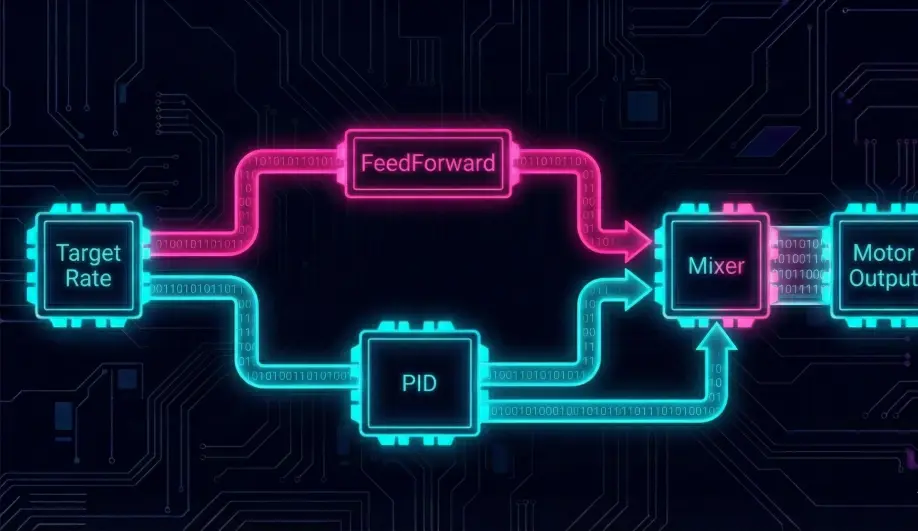
- The Problem: Waiting for an error causes Latency.
- The Solution: FeedForward (FF). The controller says: "I know the pilot wants 100 deg/s. Based on previous tuning, I know that needs exactly 40% motor power. I'll add that 40% instantly."
- Result: The drone feels "Snappy" and "Direct."
2. The PID Tuning Order
The rate loop is the foundation. If it's not tuned correctly, nothing else works.
- FF First: Adjust FF until the drone tracks the stick rates reasonably well.
- P Next: Increase P until it responds crisply to gusts.
- D Last: Increase D to dampen the "bounce" when you stop a roll.
Architecture (The Engineer's View)
1. The PID Loop
For each axis (Roll, Pitch, Yaw), the controller runs a separate PID loop.
- Input:
Error = Target_Rate - Gyro_Rate. - P-Term: Proportional response. High P = Responsive but oscillates.
- D-Term: Damping. Responds to the change in error. Stops the rotation from overshooting.
- I-Term: Integral. Corrects steady-state errors (e.g., a twisted frame or CG imbalance).
- FeedForward (FF): The "Secret Sauce".
- Logic: "I know I want to rotate at 100 deg/s. I know my frame needs 30% power to do that. I'll just apply 30% power now without waiting for an error to develop."
- Result: Zero-latency response.
2. Filtering
Before the Gyro data hits the D-Term, it must be filtered to remove vibration noise.
- Low Pass Filters:
FLTD,FLTE. - Notch Filters: Targeted removal of propeller frequencies (Harmonic Notch).
3. Output Hand-off
The Rate Controller calculates a normalized value (-1.0 to +1.0) representing "Torque".
- It calls
motors.set_roll(output),motors.set_pitch(output), etc. - It does not decide which motors spin. That is the job of the Mixer.
Key Parameters
| Parameter | Default | Description |
|---|---|---|
ATC_RAT_RLL_P |
... | Roll Rate P-Gain. |
ATC_RAT_RLL_D |
... | Roll Rate D-Gain (Damping). |
ATC_RAT_RLL_I |
... | Roll Rate I-Gain. |
ATC_RAT_RLL_FF |
... | Roll Rate FeedForward. Tuning this first is critical for crisp handling. |
ATC_RAT_RLL_FLTT |
20 | Target filtering Hz. |
Source Code Reference
- Controller Loop:
AC_AttitudeControl_Multi::rate_controller_run()
Practical Guide: Tuning the D-Term Kick
The D-Term (Derivative) is the "Shock Absorber" of your PID loop. Getting it right is the difference between a robot and a fluid flying machine.
The Symptom: "Bounce Back"
- Behavior: You do a sharp roll and release the stick. The drone stops, but then "bounces" back slightly in the opposite direction.
- Diagnosis: Low D-Term. The P-term stopped the motion, but there was nothing to dampen the inertia, so it overshot and had to correct.
- Fix: Increase
ATC_RAT_RLL_DandATC_RAT_PIT_Din small increments (0.001 steps).
The Symptom: Hot Motors & Screeching
- Behavior: The drone flies fine, but the motors come down hot, or you hear a high-pitched "Trilling" sound during flight.
- Diagnosis: High D-Term. The D-term amplifies noise. If it is too high, it reacts to invisible micro-vibrations by frantically pulsing the motors.
- Fix: Decrease D-Term immediately. If D is low but motors are still hot, check your Filters (
INS_GYRO_FILTERor Harmonic Notch).
The Pro Tip: Tune D before P
Modern theory (Betaflight/ArduPilot) suggests maximizing D first (until motors get warm) to provide maximum damping, then raising P to get sharpness. This provides the most "locked-in" feel.