RTL Mode (Copter)
Executive Summary
Return to Launch (RTL) is the primary failsafe mode. When engaged, it navigates the vehicle back to its home position (or the nearest Rally Point) at a safe altitude and automatically lands. It uses a predefined state machine to ensure obstacles are cleared before horizontal movement begins.
Theory & Concepts
1. Barrier Clearance
The #1 cause of RTL failure is the drone hitting an obstacle on the way home.
- The Logic: ArduPilot always Climbs First.
- Safety: It compares your current altitude to
RTL_ALT. If you are lower, it climbs straight up before starting the horizontal trip. This ensures it clears trees, buildings, or fences.
2. The Cone of Silence
Why does the drone sometimes not climb when you trigger RTL?
- The Problem: If you are 2 meters from your landing spot, you don't want the drone to climb to 30m just to fly 2m sideways.
- The Geometry: ArduPilot builds a "Virtual Cone" above the landing point. If you are inside this cone, the RTL altitude is limited to your current height, forcing an immediate descent and land.
Hardware Dependency Matrix
RTL is an autonomous navigation mode dependent on accurate positioning.
| Sensor | Requirement | Code Implementation Notes |
|---|---|---|
| GPS | CRITICAL | Requires a valid 3D position lock. If GPS is lost during flight, RTL cannot be engaged (the vehicle may land in place or drift). |
| Compass | CRITICAL | Required for heading control during the return path. |
| Barometer | REQUIRED | Primary source for altitude relative to Home. |
| Terrain Data | OPTIONAL | Required if RTL_ALT_TYPE is set to "Terrain" to climb over hills. |
Control Architecture (Engineer's View)
RTL operates as a rigid State Machine defined in ModeRTL::run().
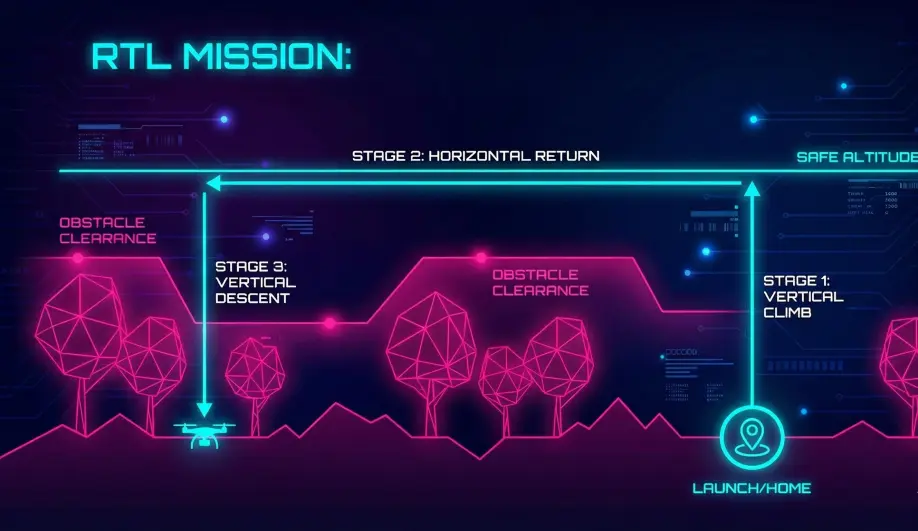
- Stage 1: Initial Climb (
INITIAL_CLIMB)- The vehicle stops horizontal movement.
- It climbs to
RTL_ALT. - Optimization: If already above
RTL_ALT, it maintains current altitude. - Cone Logic: If close to home,
RTL_CONE_SLOPElimits the climb to prevent shooting up just to come right back down.
- Stage 2: Return Home (
RETURN_HOME)- The vehicle flies a straight line to the Home coordinates.
- Speed is defined by
WPNAV_SPEED. - Nose orientation is controlled by
WP_YAW_BEHAVIOR(usually points to home).
- Stage 3: Loiter at Home (
LOITER_AT_HOME)- Once over home, it pauses for
RTL_LOIT_TIME(ms). This gives the pilot a chance to visually acquire the drone before landing.
- Once over home, it pauses for
- Stage 4: Final Descent / Landing (
FINAL_DESCENT/LAND)- It descends to
RTL_ALT_FINAL. - If
RTL_ALT_FINALis 0 (default), it proceeds to land and disarm.
- It descends to
Terrain Following
RTL can be configured to follow terrain using RTL_ALT_TYPE.
- 0 (Relative): Altitude is relative to Home. (Simple geometry).
- 1 (Terrain): Altitude is relative to the ground beneath the drone.
- Requirement: Needs a Rangefinder OR a valid Terrain Database on the flight controller.
- Calculation:
compute_return_target()recalculates the target altitude dynamically.
Failsafe Logic
- GPS Glitch: If GPS variance becomes too high during the return leg, the vehicle may switch to Land mode immediately to prevent flyaways.
- Rally Points: If Rally Points are configured, RTL will choose the closest Rally Point instead of Home.
Key Parameters
| Parameter | Default | Description |
|---|---|---|
RTL_ALT |
1500 | (cm) Return altitude (15m). |
RTL_ALT_FINAL |
0 | (cm) Altitude to hover at after returning. 0 = Land immediately. |
RTL_LOIT_TIME |
5000 | (ms) Time to hover over home before landing. |
RTL_CONE_SLOPE |
0.5 | Defines the slope of the "virtual cone" above home. High values force a steeper climb even when close to home. |
RTL_SPEED |
0 | (cm/s) Speed for the return leg. 0 = Use WPNAV_SPEED. |
Source Code Reference
- Mode Logic:
ardupilot/ArduCopter/mode_rtl.cpp - Target Calculation:
ModeRTL::compute_return_target()
Practical Guide: Configuring RTL Safety
RTL is your insurance policy. Don't trust the defaults.
Step 1: The Return Altitude
Set RTL_ALT to be higher than the tallest obstacle in your flight area (trees/buildings) plus a 10m buffer.
- Example: If trees are 20m high, set
RTL_ALT = 3000(30m). - Warning: Do not set this higher than 120m (400ft) to avoid violating airspace rules.
Step 2: The Cone of Silence
If you fly in tight spaces (like a backyard), the default "Cone" might force the drone to climb into a tree canopy when you just wanted it to land.
- The Fix: Increase
RTL_CONE_SLOPE. - Logic: A steeper slope means the drone enters the cone sooner.
- Value: Try
3.0. This effectively disables the cone for short distances, forcing the drone to climb toRTL_ALTalmost immediately, which is safer if you have obstacles nearby but clear sky above.
Step 3: The "Wait"
Always set RTL_LOIT_TIME to at least 5000 (5 seconds).
- Why? This gives you time to look up, spot the drone overhead, and verify it is descending on the correct spot. If it's drifting (bad GPS), you have 5 seconds to switch to Stabilize and save it.